Telegram
Settings, Telegram. Earlier versions labelled the tab MTProto Proxy; its address is still /settings/mtproto. The Telegram over WebSocket card, the proxy server and the shared Telegram upstream are always present. The secrets card and the Telegram Desktop WEB proxy card appear only while the proxy server is on, because neither does anything without it. The proxy card and the WEB proxy card each hide their own fields until their switch is on.
Task-shaped guides for the three Telegram modes are under Telegram. This page is the field reference.
Telegram over WebSocket
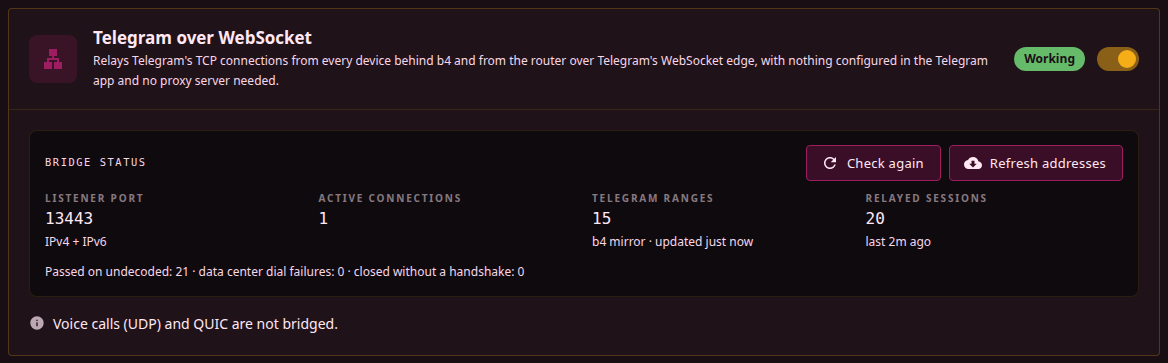
The first card on the tab. Its switch turns the WebSocket bridge on for the whole network, with no set involved.
| Parameter | Description | Default |
|---|---|---|
| Enable Telegram over WebSocket | system.mtproto.bridge.enabled. Diverts TCP connections to Telegram's address ranges, from every device behind b4 and from the router itself, into the bridge listener. Device filtering applies; there is no scoping by source interface or device. The card shows Save to apply until the page is saved, and the switch then applies without a restart. Does not need the proxy server. | Off |
While the switch is on and saved, the header shows Working when the diversion rule is installed, the bridge listener is running and no other program's rule that matches local sockets sits above the diversion rule, and Not working otherwise, with the missing part named when the pointer rests on it. The Bridge status box holds no settings:
| Item | Meaning |
|---|---|
| Listener port | The bridge listener's port, 13443, which is fixed, and the address families it listens on, or not running |
| Active connections | Bridged connections open right now |
| Telegram ranges | How many ranges are in use, where the list on top of the built-in one came from (telegram.org, b4 mirror, saved copy, GeoIP file, or built-in list when none of them is available) and when it was last updated. See Address list |
| Relayed sessions | How many sessions the bridge has relayed, and when the last one was |
| Counters line | Shown once any of them is above zero. Passed on undecoded: connections that were not MTProto or could not be mapped to a data centre, handed to the Cloudflare Worker or dialled directly, as described under Connections the bridge passes on. Data center dial failures: MTProto sessions for which no upstream route connected. Closed without a handshake: connections that closed, or stayed silent for the whole handshake wait, before sending a first byte |
| Button | What it does |
|---|---|
| Check again | Re-runs the kernel check for TPROXY support |
| Refresh addresses | Downloads the address list again instead of waiting for the daily refresh, and reports the number of ranges or the error |
The warnings above the box, each explained under Troubleshooting:
| Warning | Meaning |
|---|---|
| No TPROXY support | The kernel lacks the tproxy or socket module, so no diversion rule is installed and the header reads Not working. The warning names the packages that add them, or the missing modules |
| Firewall setup is off | Skip IPTables/NFTables Setup is on in Settings, Core, Firewall, so b4 installs no rules at start-up. A save installs the routing rules until the next restart |
| The bridge listener failed | Port 13443 could not be bound, with the error. b4 retries, and Telegram connections take the normal path until it succeeds |
| IPv6 listener note | Shown while IPv6 support is on and only the IPv6 socket failed to open. IPv4 goes through the bridge and Telegram over IPv6 takes the normal path |
| Downloading the address list failed | Neither telegram.org nor either b4 mirror answered. The list in use is kept, and the warning names its source |
| Not verified with TUN | b4 runs the TUN capture engine, with which the bridge has not been verified |
| Redundant sets | Sets whose routing mode is Telegram over WebSocket (built-in), each linked, with disabled ones marked off. They are redundant while the switch is on |
A note under the box states that voice calls (UDP) and QUIC are not bridged.
Proxy server
| Parameter | Description | Default |
|---|---|---|
| Enable MTProto Proxy | Starts the listener. The secrets and the WEB proxy depend on it: both reuse this listener's secrets, and their cards are hidden while it is off. | Off |
| Bind Address | Address to listen on. 0.0.0.0 accepts from every interface, 127.0.0.1 from the host only. | 0.0.0.0 |
| Port | Listen port. | 3128 |
| Expose to internet | system.mtproto.expose. Adds a firewall rule that accepts connections to the port from any address, IPv4 and IPv6, and puts it back after firewall reloads. Applies while the proxy is enabled. See Access from the internet. | Off |
| Fake SNI Domain | The domain the fake-TLS handshake presents, and the site an unverified connection is spliced through to on port 443. Also seeds a generated secret. | storage.googleapis.com |
With Expose to internet off, b4 adds no firewall rule for the port: a host whose firewall drops incoming connections keeps the proxy unreachable from outside, and a host without one leaves it reachable. The rule acts on this host only; a router in front, carrier-grade NAT and a cloud provider's firewall are covered under What the switch cannot open.
Secrets
A list rather than a single value. Each entry has a name, its own switch, its own share link and its own label in the connection log.
Only fake-TLS secrets are accepted: hexadecimal, starting with ee, at least 17 bytes. A padded (dd) secret, a bare key or a base64 secret is rejected when the configuration is saved, and the save fails. The domain carried inside the secret is a label; it is never checked against the server name a client sends.
A configuration whose secrets all have their switch off starts, logs secrets: 0, and closes every client connection immediately.
Telegram upstream
Shared by the proxy server and by the Telegram over WebSocket bridge, whether the switch above or a set's routing mode feeds it, so these apply even while the proxy server is off. The routes and the order they are tried in are described under Telegram upstream.
| Parameter | Description | Default |
|---|---|---|
| Transport mode | Direct TCP, Auto (WebSocket -> TCP) or WebSocket only. Applies to the proxy server; the bridge forces Auto. | Auto |
| DC Relay | host:port of a VPS forwarding to the data centres. Ignored by the bridge and in WebSocket only mode. See DC Relay. | empty |
| Cloudflare Worker domain | One or more *.workers.dev names, comma-separated. Tried last of the WebSocket routes. | empty |
| Let sets process Worker connections | system.mtproto.cfworker_dpi. Shown once a Worker domain is set. Hands b4's own connections to the Worker to packet processing, so a set whose targets cover the Worker applies its DPI strategy to them. The Cloudflare-proxied domains skip DPI processing either way. See DPI processing. | Off |
| CF proxy fallback | Uses a rotating pool of Cloudflare-proxied domains for the data centres Telegram's own edge does not serve. | On |
| Custom WebSocket domain | One domain that proxies WebSocket traffic to Telegram. b4 prepends kws1., kws2. and so on per data centre. | empty |
| Telegram WS edge IP | Replaces the address a native kws*.web.telegram.org dial goes to. Does not affect the custom domain. | 149.154.167.220 |
| Fronting name for Telegram's WS edge | A TLS name, such as sprinthost.ru, tried on Telegram's own edge when the handshake under its kws* names goes unanswered. See Fronting name. | empty (off) |
Telegram Desktop WEB proxy
| Parameter | Description | Default |
|---|---|---|
| Enable the WEB carrier | Serves the MTProto stream over HTTPS on the relay hostname. | Off |
| Relay hostname | A bare public DNS name, no scheme, port or path, punycode for international names. Needs its own hostname with publicly trusted TLS on 443. | empty |
| Relay port | Empty serves the relay on the web server's port, on the relay hostname only. A value opens a listener of its own that answers the relay hostname as the relay and every other name or IP with the placeholder page, so the web interface is not reachable through it. Cannot equal the web server or MTProto proxy port. Filled with 443 when the carrier is switched on for the first time. | empty |
| Expose to internet | system.mtproto.web_proxy.expose. Shown while Relay port holds a port, and while it is on with the field empty, so that it can be turned off. Adds a firewall rule that accepts connections to the relay port from any address, IPv4 and IPv6. With the field empty the relay rides the web server's port, which only the web server's own switch opens, together with the interface. See Access from the internet. | Off |
| Certificate for the relay hostname | PEM pair served on the relay port only. Empty: the web server's pair, which then has to be trusted for the relay hostname and makes the interface HTTPS-only with a name-mismatch warning on visits by IP. Both or neither. | empty |
| Placeholder page | Upload, download or remove a self-contained HTML file of at most 1 MiB that replaces the built-in placeholder, stored as webproxy_page.html next to the configuration. | built-in |
The switch and the hostname take effect on the next request; the port and the certificate restart only the relay listener. The full set of preconditions is on Telegram Desktop WEB proxy.
Advanced
Three timeouts where 0 selects the built-in value rather than turning anything off.
| Parameter | Description | Default |
|---|---|---|
| Max Connections | Ceiling on accepted TCP connections, counted before any handshake, so probes and port scans consume it too. It is not a limit on authenticated clients, and it does not apply to the WEB carrier. 0 uses the built-in value. | 2048 |
| TCP User Timeout (sec) | Force-closes a client connection after this long with unacknowledged data, so a phone that left the network is detected in about two minutes instead of about fifteen. 0 uses the built-in value, -1 disables it. Applies to the accepted client socket only; connections towards Telegram use a fixed 120 seconds. | 120 |
| Idle Timeout (sec) | Closes a relayed session after this long with no traffic in either direction. 0 uses the built-in value, -1 disables it. | 300 |
Fallback sources
| Parameter | Description | Default |
|---|---|---|
| CF proxy domain list URL | Where the CF proxy pool is refreshed from, hourly. | tg-ws-proxy's list |
| DC list fallback mirror | Uses the mirror below when Telegram's own endpoint for the data-centre list is unreachable. | On |
| DC list mirror URL | The mirror to use. The default is hosted by the b4 author and receives the requesting IP address, nothing else. | b4 author's mirror |
| Bridge Handshake Wait (sec) | How long the bridge waits for a client's first byte before dropping the connection. Applies to the Telegram over WebSocket switch and to sets in the Telegram over WebSocket routing mode alike, so the field stays here where it is visible with the switch off. 0 uses the built-in value; -1 waits indefinitely rather than disabling the wait. | 180 |
The data-centre list and the CF proxy pool are downloaded only while the MTProto proxy, the Telegram over WebSocket switch or an enabled set in the Telegram over WebSocket routing mode is on. With all of them off, b4 contacts neither Telegram nor the list hosts. The lists are fetched at start-up and on the save that turns one of these on or changes a list's URL or switch, with no restart; the CF proxy pool is then refreshed hourly. A failed download is tried again after 30 seconds, the wait doubling after each further failure up to an hour, so a list that could not be fetched at start-up, for example before the uplink was up, arrives without a restart. Until a download succeeds, the built-in addresses and domains are used.
b4 restarts the MTProto proxy itself when the enable switch, port, bind address, Fake SNI, transport mode, custom WebSocket domain, WS edge IP, fronting name or CF proxy fallback changes, which drops the sessions it is carrying. Secrets and the WEB proxy fields are applied without restarting it; a changed relay port or certificate restarts only the relay listener. The Expose to internet switches change only the firewall rule. The Telegram over WebSocket switch takes effect on save, with no restart of the service.