System
The System tab holds the settings of b4 itself, on the sub-tabs Service (the service process and its log), Web Server (the web interface) and Backup (backups of the configuration).
Changes are saved with Save Changes in the page header, see Saving and restarting. Each field takes effect either on save or after a service restart:
| Sub-tab | Applies on save | Applies after a restart |
|---|---|---|
| Service | Language, Time Zone, Update mirrors, Log Level, Log Directory | Memory Limit, Instant Flush, Syslog |
| Web Server | Username, Password, Expose to internet | Bind Address, Port, TLS Certificate, TLS Key |
| Backup | No fields: each button acts at once | - |
Service
The Service sub-tab has two cards, Service and Logging.
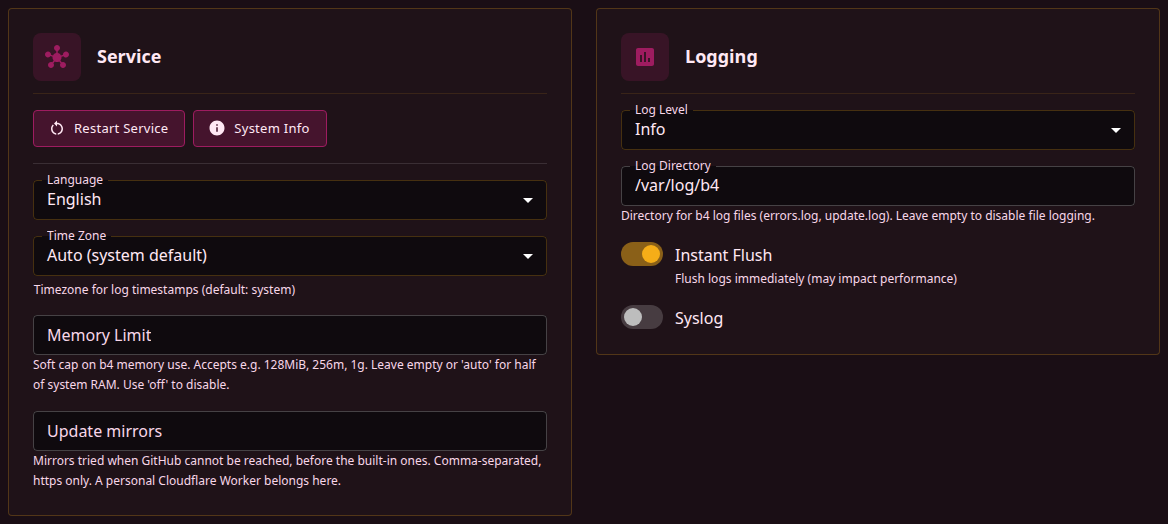
Restart Service
Restart Service asks for confirmation, then restarts b4. The way it restarts depends on the service manager b4 finds, checked in this order:
| Service manager | Detected by | Restart |
|---|---|---|
systemd | /etc/systemd/system/b4.service and the systemctl command | systemctl restart --no-block b4 |
entware | /opt/etc/init.d/S99b4 | /opt/etc/init.d/S99b4 restart |
init | /etc/init.d/b4 | /etc/init.d/b4 restart |
docker | Container markers: /.dockerenv, /run/.containerenv, the container environment variable, or a Docker, containerd, LXC or Kubernetes control group of process 1 | In place |
standalone | None of the above | In place |
A restart in place shuts b4 down the same way a stop signal does, then starts it again with the same command line, and b4 reads the configuration file anew. The process ID stays the same, and a container runtime or a supervisor sees no exit.
The dialog then checks every 2 seconds whether b4 answers, for up to a minute, and reloads the page 5 seconds after it does. The Service Manager row of System Info shows which manager b4 found.
System Info
System Info opens the System Diagnostics dialog with a report b4 collects when the dialog opens:
| Section | Contents |
|---|---|
| System | Host name, distribution, OS and architecture, kernel, CPU cores, available and total memory, and a Container row when b4 runs in one |
| B4 | Version and commit, build date, service manager, process ID, memory use, uptime |
| Process | Go heap in use and reserved, goroutines, OS threads, open file descriptors and GC cycles, read when the dialog opens |
| Paths | The b4 binary, the configuration file, the data directory, errors.log, geosite.dat and geoip.dat |
| Geodata | The size of each database, the totals of domains and IPs, the ASN cache and the ASNs not resolved yet |
| Engine | NFQUEUE or TUN, the start error when the engine failed, and with TUN its device, addresses, capture, packet counters and capture rules |
| Firewall | The backend, the NFQUEUE check, how many routing sets are installed and, while installing them fails, the error and the time of the next attempt (see Routing, when the rules cannot be installed), flow offloading, bridge netfilter, the rule restores of the firewall monitor, and b4's own rules |
| Network | Every interface except loopback, with its state, MAC address, MTU and addresses |
| Kernel Modules, Kernel Capabilities | Whether each module b4 uses is loaded or built in, and whether packet interception, transparent proxying and the reply-side bypass are available, with the packages that provide a missing one |
| Firewall Tools (at least one needed), Required Tools, Optional Tools | Which commands are found: iptables, iptables-legacy and nft, at least one of which is needed; tar and curl; optional ones such as ipset and wget |
| Storage | Free space and read-write state of /, /opt, /tmp, /jffs, /mnt/sda1 and /etc/storage, where they exist |
Copy JSON puts the whole report on the clipboard as JSON. The report is not masked. It holds the host name, the addresses and MAC address of every interface, and b4's firewall rules. The MCP tool b4_diagnostics returns the same report.
Service settings
The rest of the Service card:
| Field | Description | Default |
|---|---|---|
| Language | Language of the web interface, English or Русский. The interface switches as soon as one is picked, and Discard Changes switches it back. The settings page applies the saved language in any browser that opens it | English |
| Time Zone | Time zone of the timestamps in b4's log, picked from the list of zone names. Auto (system default) keeps the zone of the system, or the one in the TZ environment variable b4 was started with | Auto (system default) |
| Memory Limit | Soft cap on b4's memory use, with the values below | auto |
| Update mirrors | Comma-separated https addresses tried before the built-in mirrors when a download of b4's releases, the installer or the GeoSite and GeoIP databases from GitHub fails. See Update mirrors | - |
| Memory Limit | Cap |
|---|---|
auto or empty | Half of the system memory |
A size such as 128MiB, 256m or 1g | That size, with k, m and g as multiples of 1024 |
off, disabled or 0 | None |
The cap is passed to the Go runtime as its memory limit: the runtime collects garbage more often as b4 nears it, and going over it does not stop b4. A cap below 32 MiB is raised to 32 MiB. A GOMEMLIMIT environment variable takes precedence over the field. A value that does not parse is refused on save.
Logging
The Logging card sets how much b4 logs and where the log goes.
| Field | Description | Default |
|---|---|---|
| Log Level | How much b4 logs, see the levels below | Info |
| Log Directory | Absolute path of the directory for errors.log and update.log, created when missing. An empty field turns file logging off | /var/log/b4 |
| Instant Flush | Writes every log line out at once. When it is off, lines collect in a 16 KiB buffer that is written out every 2 seconds and whenever it fills | On |
| Syslog | Sends every log line to the system log as well, tagged b4. When the system log cannot be reached at start-up, b4 logs a warning and runs without it | Off |
| Level | What is logged |
|---|---|
| Error | Errors and warnings |
| Info | Adds the main events and a line for every entry of the Traffic page |
| Trace | Adds the details of packet and DNS processing |
| Debug | Adds debug output |
At Error the Logs page, which shows the log, carries only errors and warnings. The Traffic page has a stream of its own and does not depend on the level.
Info is the usual level in normal operation, and Trace or Debug the one for diagnosing a problem.
Every log line goes to the standard error output b4 was started with and to the Logs page, and with Syslog on to the system log as well. The log directory holds two files:
errors.log: error lines, warnings from start-up, and anything else written to the process's standard error once the file is open, such as the output of a crash. Past 1 MiB it is renamed toerrors.log.1, replacing the previous one.update.log: the last update started from the web interface.
The command-line flags --log-dir, -i/--instaflush and --syslog take precedence over these fields for the run they start, see CLI parameters.
Web Server
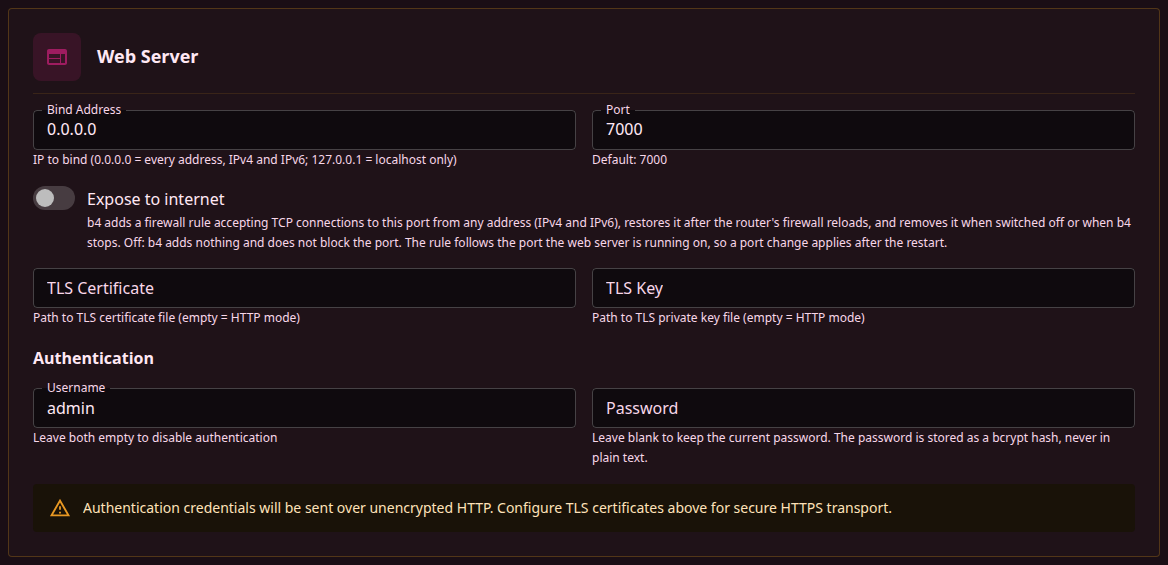
The Web Server sub-tab configures the listener that serves the web interface, its API and the MCP endpoint. The MCP settings themselves are on the Integrations tab.
| Field | Description | Default |
|---|---|---|
| Bind Address | Address to listen on. 0.0.0.0 or :: is every address, IPv4 and IPv6; 127.0.0.1 is the host itself only | 0.0.0.0 |
| Port | Port of the web interface, 1 to 65535. A port another b4 listener uses is refused on save, and so is a new port that another process holds. 0, set in the configuration file or with --web-port 0, turns the web server off together with the API and the MCP endpoint | 7000 |
| Expose to internet | Adds a firewall rule that accepts TCP connections to the port from any address, IPv4 and IPv6, and puts it back after firewall reloads. Can be turned on only with a username and a password set, and is not applied while Skip IPTables/NFTables Setup is on. The rule follows the port the running server listens on, and a changed port moves it at the next restart | Off |
| TLS Certificate | Path to the certificate file, .crt or .pem | - |
| TLS Key | Path to the private key file, .key or .pem, without a passphrase | - |
The certificate and the key are set together: one without the other is refused on save. With both empty the web interface is served over plain HTTP. The files are read when the web server starts, and a renewed certificate takes effect after a restart.
Authentication
| Field | Description | Default |
|---|---|---|
| Username | Login name of the web interface. An empty field turns authentication off and deletes the stored password | - |
| Password | Stored as a bcrypt hash, never in plain text. A blank field keeps the stored password; while one is stored, the empty field shows Unchanged (leave blank to keep) when it has focus | - |
With both set, the web interface asks for them, and a login issues a session token. A token stays valid while it is used at least once every 24 hours, and it ends when b4 restarts. A change of the username or the password does not end the sessions already open. After 5 failed logins within 15 minutes, logins from that address are refused for 5 minutes.
Authentication applies only when both fields are filled. With only one of them set, the web interface stays open without a login, and the card shows a warning.
Without a TLS certificate the username, the password and every session token cross the network unencrypted. The card shows a warning while a username and a password are set without a certificate.
HTTPS covers the certificate, the key requirements and what b4 does when the files become unusable. Access from the internet covers the rule behind Expose to internet and what it cannot open.
Backup
The address /settings/backup of earlier versions opens this sub-tab.
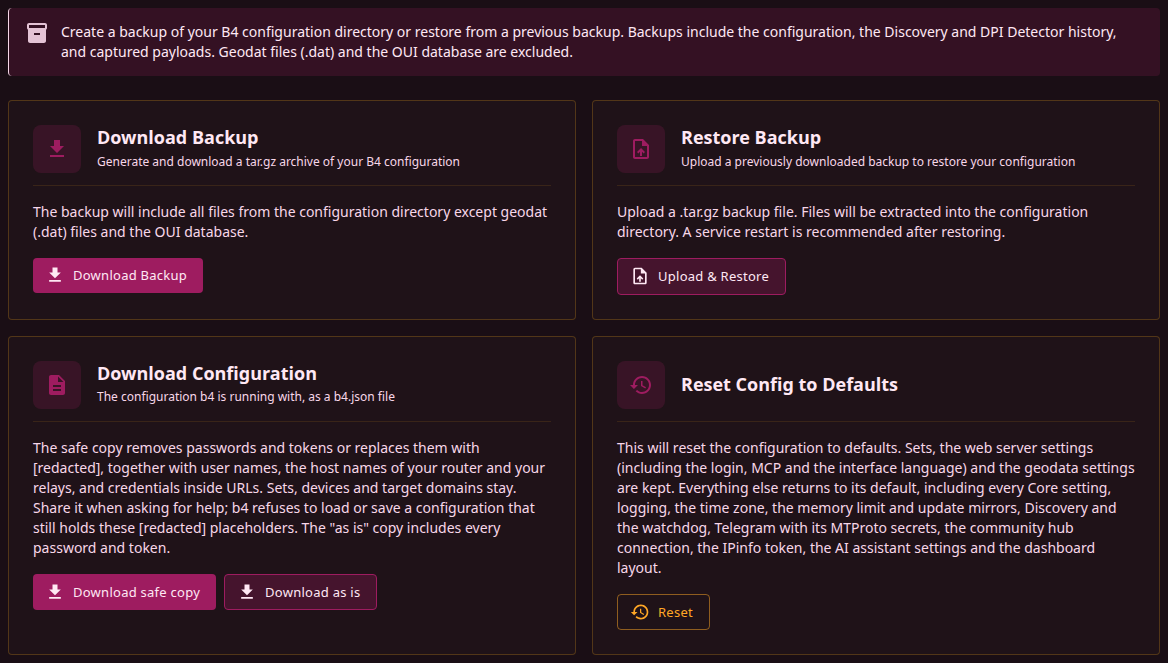
Download Backup
Download Backup saves b4-backup-<date>-<time>.tar.gz, a gzip-compressed tar archive of the configuration directory, the directory that holds b4.json, with its subdirectories. Besides b4.json, that directory holds the history of Discovery (discovery_history.json) and of the DPI Detector (detector_history.json) and the payloads (captures), and they go into the archive too. The archive leaves out:
- the GeoSite and GeoIP databases (
.datfiles) and unfinished downloads (.dat.newand.partfiles); oui.txt, the vendor database of device filtering;- hidden directories, among them
.hubwith the Community Hub author key, hidden.tmpfiles, directories namedout, and theb4update-<n>working directories of an update; - symbolic links and anything else that is neither a regular file nor a directory;
- the b4 binary, when it sits in that directory.
b4.json goes into the archive as it is, with the password hash, the tokens and the secrets, and so does ai_secrets.json, which holds the AI API keys when one is stored. The safe copy is the file meant for sharing.
Restore Backup
Upload & Restore takes a .tar.gz archive of up to 50 MiB and writes its files into the configuration directory:
- a file in the archive replaces the file of the same name, and a file the archive does not hold stays as it is;
- entries with an absolute path or with a path that leads outside the configuration directory are skipped, and so are entries that are neither a file nor a directory;
- nothing is written outside the configuration directory or through a symbolic link inside it.
An archive without a single file to restore is refused. After a restore the Restart B4 Service dialog opens. Until the restart b4 keeps running with the configuration it had loaded, and a save in that time writes that configuration over the restored b4.json.
The restored b4.json replaces the current one, and no copy of the current one is kept. A backup downloaded first preserves the current settings.
Download Configuration
Download Configuration saves the configuration b4 is running with as a single JSON file, in the form b4 writes to b4.json, where settings at their defaults are left out. Values given by command-line flags, such as --web-port or --log-dir, appear as the file holds them.
| Button | File | Content |
|---|---|---|
| Download safe copy | b4-config-safe-<date>-<time>.json | The configuration with credentials, private host names and secrets in URLs masked, for sharing when asking for help |
| Download as is | b4-config-<date>-<time>.json | The configuration with the password hash and every token and secret |
The API serves the same files at GET /api/config/download?safe=true and GET /api/config/download.
Safe copy
| What | Fields | In the safe copy |
|---|---|---|
| Web interface password | Password | Removed; "password_set": true records that one is set |
| Credentials | The web interface Username, the IPinfo and MCP access tokens, the SOCKS5 username and password, the names and values of the MTProto secrets, the reference to the stored AI API key, the username and password of a set's upstream proxy | [redacted] |
| Host names of the router and of the owner's relays | The TLS certificate and key paths of the web server and of the Telegram WEB proxy; the MCP server's allowed_origins, except *, localhost and IP addresses; DC Relay, Custom WebSocket domain, Cloudflare Worker domain and Relay hostname | [redacted] in place of the name. In a path, the Relay hostname, every directory name with a dot after its first character and every file name with two such dots or more, apart from its extension, are replaced: /etc/letsencrypt/live/[redacted]/fullchain.pem |
| Secrets inside URLs | The GeoSite and GeoIP download URLs, the AI Endpoint, Hub mirrors, the MCP server's allowed_origins on localhost or an IP address, the addresses on a set's Discovery tab, entries of the watchdog's Older per-domain list written as URLs or holding @, ?, # or / | Credentials, the path, query values and the fragment become [redacted]; the scheme, host and port stay. The download URLs of b4's built-in geodata sources stay unchanged |
| A DoH resolver | A set's DNS-over-HTTPS URL, and Discovery's Trusted DNS server when it is an https:// URL | The host stays when it is an IP address or on b4's list of public resolvers; any other host becomes [redacted], or for example [redacted].nextdns.io under a known provider's domain. A path other than / and /dns-query, such as a personal resolver id, becomes /[redacted]. Credentials, query values and the fragment are masked as in other URLs |
| Custom Telegram sources | CF proxy domain list URL, DC list mirror URL | [redacted], unless empty or the built-in default |
| Update mirrors | Update mirrors | [redacted] for every entry |
| Everything else | Sets with their names, targets and strategies, the host and port of a set's upstream proxy, plain DNS servers, devices with their MAC addresses, IP addresses and names, interfaces, listen addresses and ports, SOCKS5 allowed sources, public DoH resolvers, geodata file paths | Unchanged |
b4 refuses to load a configuration file that holds [redacted] in one of the masked fields. At start-up it then runs on the default settings and takes only Port and Bind Address of the web server from the file: the web interface stays at its address, without a login and without TLS. The file is copied next to itself as b4.json.corrupt, the same as an unreadable file, and an error in the log names the fields. The next save replaces the file.
b4 also refuses to save a configuration that holds the placeholder in a masked field, and the error names each such field. A safe copy without the placeholder, such as the copy of a configuration with nothing to mask, loads like any other configuration file.
The MCP tool b4_get_config returns the configuration with its credentials and the TLS key path of the web server removed, and with host names and URLs unchanged, see What is stripped.
Reset Config to Defaults
Reset asks for confirmation, then replaces the configuration with the defaults, except for three parts it keeps as they are:
| Kept | Contents |
|---|---|
| Sets | Every set with its targets, strategies, DNS and routing |
| Web server settings | Bind Address, Port, Expose to internet, TLS Certificate, TLS Key, Username, Password, Language, and the MCP server settings on Integrations with the access token |
| Geodata settings | Paths, download URLs and automatic updates of the GeoSite and GeoIP databases |
Everything else returns to its default:
- the whole Core tab: the packet engine, interfaces, IP block detection, devices with their names and MSS values, the firewall, MSS clamping, DNS and SOCKS5;
- Time Zone, Memory Limit and Update mirrors on the Service card, and the Logging card;
- the Discovery tab with the watchdog, and the Telegram tab with the MTProto secrets;
- IPinfo, AI Assistant and Community Hub on Integrations;
- the layout of the dashboard.
Files beside b4.json, such as the Discovery and DPI Detector history, the payloads and ai_secrets.json, stay as they are.
The reset is saved and applied like a save from the page header: what applies on save takes effect at once, and the rest after the next restart. The page reloads after it.