Routing
The routing tab controls how DNS queries are handled and where traffic matched by the set is sent. It has two sections: DNS redirect and Traffic routing.
DNS redirect
Redirects DNS queries for domains in the set to a specified DNS server.
Some providers intercept DNS responses and substitute IP addresses (DNS poisoning). The connection ends up going to the wrong address even if the domain itself is not blocked directly. DNS redirect sends the query to an alternative server, bypassing the interception.
This section covers the plain DNS server. For encrypted DNS (DoH), pinned addresses, DNS over TCP and the global DNS settings, see DNS.
Configuration
- Enable DNS redirect
- Pick a DNS server from the list or enter an IP manually
If you do not know which DNS to pick, start with any server from the list other than Google DNS (8.8.8.8). Google DNS is often one of the first to be blocked by providers.
Server list
Picking a server fills the IP into the field automatically. You can also enter any other IP manually.
If the DNS server field is empty, the redirect will not work, even when it is turned on.
DNS query fragmentation
The Fragment query toggle splits the DNS packet into several parts before sending.
Used when the provider inspects the contents of DNS packets, even those to third-party servers, and blocks queries based on their contents.
Fragmentation only affects DNS queries for domains in the current set. Other DNS traffic is not modified.
Traffic routing
Routes traffic matched by the set through a specific network interface - for example, a VPN, WireGuard, or another tunnel.
Routing always steers by destination: every rule b4 installs matches the addresses the set has collected, from its IP targets and from the addresses its domains resolve to. Source devices and source interfaces narrow whose traffic is offered to that rule; they do not select traffic on their own. A set with routing enabled and no domain or IP target therefore steers nothing, and b4 installs no rule for it and says so in the log.
To route everything from a device, keep the device selected under Source devices and turn on Match any IP address on the Targets, IP addresses tab.
Routing mode selects what happens to matched traffic:
| Mode | Description |
|---|---|
| Output interface | Sends matched traffic out a network interface. Described below. |
| Upstream SOCKS5 proxy | Hands matched traffic to a SOCKS5 proxy. See Upstream SOCKS5 proxy. |
| Telegram over WebSocket (built-in) | Intercepts matched Telegram traffic and relays it over Telegram's WebSocket edge. The switch on Settings, Telegram does the same for the whole network without a set. See Telegram over WebSocket. |
| Block | Drops or rejects matched traffic. See Blocking. |
General diagram
How it works (in detail)
Routing uses policy-based routing - routing decisions based on packet marks:
-
Collecting IPs. When b4 sees a DNS response for a domain in the set, it extracts the IP addresses and adds them to an internal IP set (nftables set or ipset). A forwarded or pinned response that brings addresses b4 has not written to the set recently is passed on to the client once b4's update of the set for those addresses has finished, so the connection that follows it usually takes the set's route. b4 waits at most 250 ms each time it sees the response; when the update takes longer, for example while b4 re-applies its routing rules, the response goes out at the limit and the first connection can still leave outside the set. A response that b4 resolves itself through the set's DNS redirect goes out after the addresses are written, without this limit. Responses that arrive while an update for the set is waiting share it, so a burst of responses takes a few updates rather than one each, and a response whose addresses were written recently is normally not held. With the TUN engine the response is not held, and the first connection to a new address can leave before the address is in the set. IPs entered manually in the set targets are added when the configuration is loaded.
-
Marking packets. b4 creates firewall chains for each set:
- PREROUTING (mangle) - marks forwarded traffic (from devices on the network) when the destination IP is in the set. If source interfaces are set, only traffic from those interfaces is marked.
- OUTPUT (mangle) - re-marks the packets b4 injects itself, which are locally generated and would otherwise leave by the router's normal uplink. It also marks other traffic the router originates, unless Router's own traffic says not to.
-
Policy routing. For marked packets an
ip ruleis created: packets with a specificfwmarkare sent to a separate routing table where the default route points at the output interface. -
Masquerade. In the POSTROUTING (nat) chain, masquerade is applied to all marked traffic leaving through the target interface - the packet's source IP is replaced with the output interface's IP. This is required so that reply packets return through the same tunnel.
-
Pre-resolution. When routing is enabled, b4 immediately resolves all domains in the set targets and adds their IPs to the set. This enables routing from the first request without waiting for DNS traffic to pass through NFQUEUE. The names are resolved through the set's own resolver when its DNS redirect has one; see Lookups b4 makes itself.
Routing setup
- Enable Routing
- Pick Source interfaces - which interfaces to intercept traffic from
- Pick the Output interface - where to send the traffic
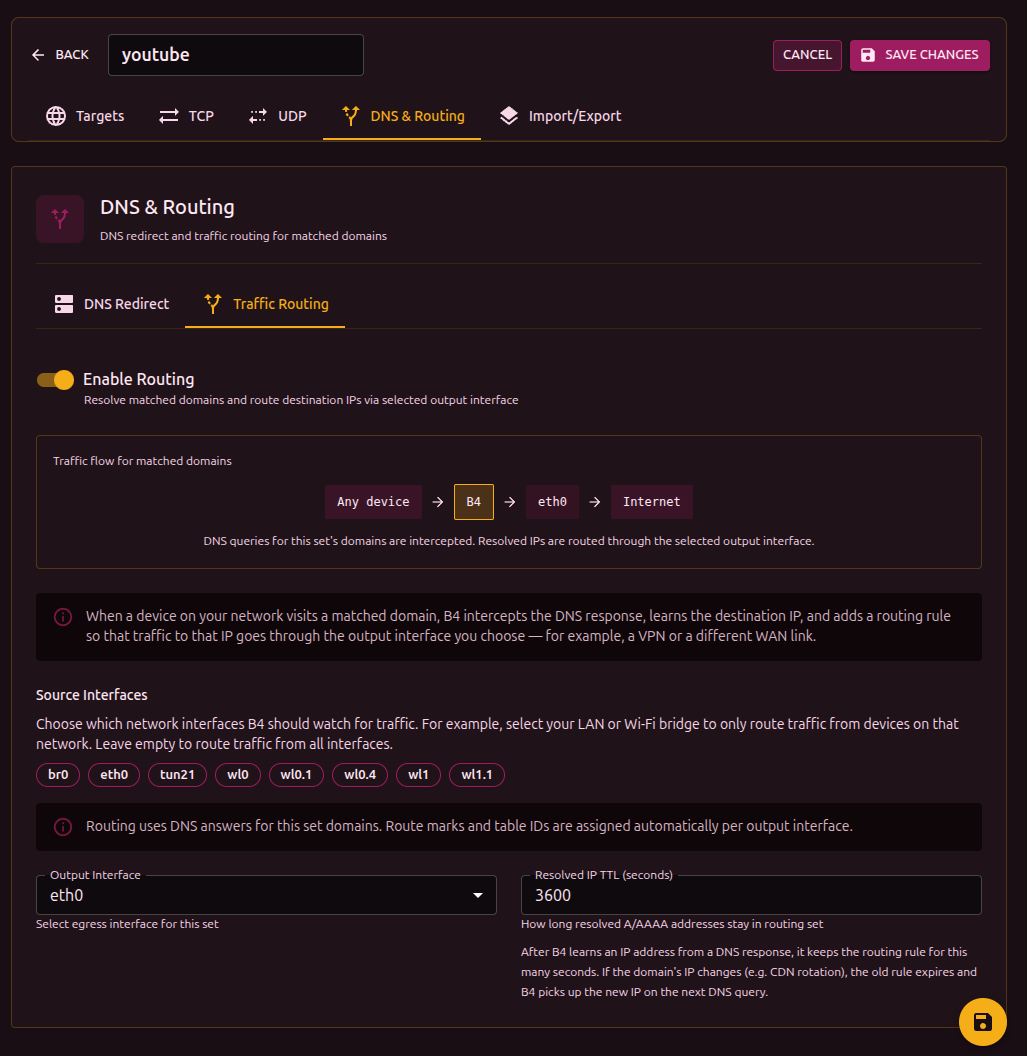
Once enabled, a flow diagram appears at the top of the section:
[Source interfaces] -> B4 -> [Output interface] -> Internet
The diagram updates as settings change.
Source interfaces
Define which network interfaces traffic is intercepted from for routing. Shown as clickable badges - click to toggle.
This is an ingress filter, and it is not the same setting as Capture Interfaces under Settings, Core, Packet Engine, which filters what the engine inspects and compares the interface a packet leaves by. Which interface is which puts the three side by side.
If no source interface is selected, routing applies to all traffic arriving from anywhere, and - subject to Router's own traffic - to traffic the router originates itself. Selecting a source interface, or a source device, restricts the set to traffic arriving from it and leaves the router's own traffic on the normal route, since that traffic arrives from no interface and from no device.
If a previously chosen interface has disappeared from the system (for example, the VPN connection dropped), it is shown in red with a "stale" marker.
Output interface
The network interface that marked traffic is sent through:
| Interface | Description |
|---|---|
wg0, wg1 | WireGuard tunnel |
tun0, tun1 | OpenVPN tunnel |
ppp0 | PPP connection |
If the chosen output interface becomes unavailable, a warning appears. Routing will not work until the interface is back. See Kill switch for what happens to the set's traffic in the meantime.
When the output interface is a tunnel that is up - a TUN/TAP device or WireGuard - b4 leaves that set's packets alone,
the same way it does in proxy mode: no faking, fragmentation or desync, and no SYN health check, dead-IP escalation, IP
block detection or TCP duplication. The segment it would mangle is the inner one, which is wrapped or terminated before
it ever reaches the network, so the work buys nothing and costs CPU on every connection. The connection still appears in
the connection log, tagged routed-><iface>. Three cases keep their bypass strategy: a set routed to a plain interface
such as a second uplink, a set whose output interface exists but is down and so cannot carry the traffic at all, and a
domain-only set with no IP targets, which never routes anything either. A set limited to a source interface or a source
device hands off like any other, because b4's engine matches on the destination alone and cannot tell an in-scope client
from one the routing rules never touch.
Router's own traffic
Whether connections the router opens itself - a package update, a health check, the DNS resolver, another program running on the box - also go out the output interface when they are addressed to something in the set. Traffic forwarded from the network is unaffected by this setting.
| Value | What happens |
|---|---|
| Automatic (default) | Routes the router's own traffic, except when the output interface is a TUN/TAP device a userspace program reads. There it is left on the normal route. |
| Route it too | Always routes it. |
| Leave it alone | Never routes it. |
The exception exists because of a loop. A proxy with a TUN inbound - Xray, sing-box, a tun2socks-style client - does not
forward packets; it terminates the connection and opens its own to the destination, from this same router. That new
connection is addressed to something in the set, so b4 marks it and routes it back into the very TUN the proxy is reading.
The proxy answers it the same way, and so on. Every turn is a fresh source port, so nothing in the kernel recognises it as
a repeat, and each turn costs the proxy another session and another socket. In practice the box runs out of memory in
minutes.
b4 recognises such an interface by /sys/class/net/<iface>/tun_flags, which the kernel creates for every device opened
through /dev/net/tun. WireGuard, PPP, VLANs and physical interfaces are not affected: they cannot re-dial a connection,
so the router's own traffic keeps following the set on Automatic.
Choosing Route it too on a TUN interface is allowed - a TUN whose reader never dials the destination directly is
harmless - but b4 logs a warning and installs a rate limit ahead of the marking, so a loop that does start is capped at
200 new router-originated connections per second per destination list instead of growing without bound. The limit counts
only connections to addresses the set matches, so ordinary router traffic cannot use up its budget. It goes in wherever
the egress could re-dial: a TUN or TAP device, or an interface b4 cannot classify yet because it does not exist when the
rules are built. A plain interface and a WireGuard tunnel never get one. On iptables it needs the xt_hashlimit module;
b4 loads it itself, and warns if the kernel does not have it.
A set that already has a source interface, or an included source-device list, never routes the router's own traffic, whatever this is set to, so the setting is shown greyed out. An exclude list does not scope the set that way, so the choice still applies there.
A set routed into a proxy's TUN, where the proxy reaches some of those destinations directly (a freedom/direct
outbound, a bypass rule, its own DNS), is the loop above. Automatic is the setting for that case.
Kill switch
Off by default. When the output interface disappears - the tunnel drops, the VPN client restarts - the kernel removes the default route b4 put in the set's routing table. The mark rule then finds an empty table, the lookup falls through to the main table, and the set's traffic quietly leaves through the normal uplink with the router's real address. Nothing in the rules looks wrong, which is what makes it easy to miss.
With the kill switch on, b4 also puts a blackhole default route in the set's table at a worse metric than the real one.
While the interface is up the real route wins and nothing changes. When it goes away the blackhole is all that is left and
the set's traffic is dropped instead of leaking. Only this set's traffic is affected; everything else keeps using the main
table as usual. Sets that share an output interface normally share one routing table, so a set with the kill switch on is
given a table of its own rather than blackholing its neighbours. That applies to the tables b4 assigns itself; two sets
pinned by hand to the same routing.table still share it, and then the switch is on for both if it is on for either.
b4 puts the real route back as soon as the interface returns, so the kill switch does not need to be turned off and on again after a reconnect.
Egress IP
Optional. Rewrites the source address of this set's traffic on the way out, instead of leaving the output interface's own address in place. In firewall terms it swaps the set's MASQUERADE rule for SNAT --to-source.
The point of this is to delegate the routing decision to a device b4 does not control. If the tunnels live on an upstream router, that router can already pick a path by source address; b4 only has to stamp the right source. No tunnel interface and no extra routing table are needed on b4's own host, and unlike an upstream SOCKS5 proxy the rewrite happens in the kernel, so it costs no per-packet CPU.
An egress IP requires an output interface: the rule is pinned to that interface so a multi-WAN failover cannot send packets out a second uplink still carrying the first one's source address.
For this to work end to end:
- b4 puts the address on the output interface itself and takes it back when the set stops using it, so there is nothing to add by hand and nothing to persist across reboots. If the interface loses the address, for example on a DHCP renewal or a link flap, b4 notices and puts it back. Before claiming an address b4 sends an ARP probe; if another host on the segment answers for it, or the address cannot be added, b4 logs a warning and falls back to masquerading rather than breaking that host or sending traffic that can never be answered. An address you configured yourself is used as it stands, and b4 removes only addresses it added.
- The upstream device must route that source into the path you want, for example
ip rule add from 192.168.1.51 lookup 100on Linux, or amanglerule withsrc-addressplusaction=mark-routingon RouterOS. - The upstream must not drop the packets on reverse-path checks. A router with strict
rp_filterand no route back to b4's box for that address discards them before any policy rule is consulted. This is the most common reason a correct-looking setup moves no traffic.
The address family has to match. An IPv4 egress IP rewrites IPv4 only. What happens to the set's IPv6 traffic then depends on Enable IPv6 Support in Settings, Core, Packet Engine:
- IPv6 support on. The set's IPv6 traffic is still diverted to the output interface, keeps masquerading, and leaves with the interface's own IPv6 address. A set carries one egress IP, so an IPv6 address entered in its place moves the rewrite to IPv6 and returns IPv4 to masquerading.
- IPv6 support off. The set has no IPv6 rules at all. Its IPv6 traffic is not marked, not diverted and not masqueraded: it follows the router's normal route, which for a dual-stack destination means the set is bypassed rather than routed with the wrong source address.
An egress IP that nothing answers for is a silent failure: packets leave, replies never come back, and the set's rules still look correct. Check the address exists on the interface before blaming the set.
Not available in TUN engine mode with whole-default capture. There b4 reinjects packets on a path that bypasses this rule, so the setting has no effect.
IP TTL (entry lifetime)
How long, in seconds, an IP obtained from a DNS response is kept in the routing IP set. When the TTL expires, the entry is removed automatically.
Default: 3600 seconds (1 hour).
IPs listed in the set targets are permanent members: they are written on every configuration sync and taken out of the kernel set when they are removed from the targets.
For stable services with constant IPs you can raise the TTL. For CDN services where IPs change frequently, lower it.
Firewall backend
| Backend | Requirements | Description |
|---|---|---|
| nftables | nft binary | Creates the b4_route table with prerouting, output, postrouting chains. IP sets support interval and timeout. |
| iptables + ipset | iptables, ipset binaries | Uses the mangle and nat tables. Creates an ipset of type hash:net to store IPs. Also checks for iptables-legacy. |
Routing uses the backend of the Firewall Engine setting, which on Auto-detect is the one b4 finds for its other rules. On iptables, routing also needs the ipset binary. Without it, or without the iptables binary, routing falls back to nftables whenever the nft binary is present, even where the nftables check of Auto-detect failed. With neither backend b4 installs no routing rule. The b4 Docker image carries all three: nft, iptables and ipset.
Nothing is created for routing, not even the b4_route table, while no enabled set has routing turned on and the Telegram over WebSocket switch is off.
When the rules cannot be installed
b4 installs the routing rules at start, on every save of the configuration, and when the firewall monitor finds them missing. When the backend rejects the base of the rules, such as the b4_route table, no set is installed, and the log reads:
[ERROR] Routing: failed to ensure base during sync (nftables): ensure table: ..., it will be retried
When only some sets fail, each of them gets a line of its own, Routing: failed to ensure rule for set '<name>' during sync: ..., and the other sets are installed.
b4 then retries on its own. The first retry comes 10 seconds after the failure, and the wait doubles after each failed retry, to 20, 40, 80, 160 and 320 seconds; from then on b4 retries every 10 minutes until a retry succeeds. The retries write their lines at the trace level, which the log shows only with the log level set to trace or debug. At the info level the cycle leaves three lines:
| Line | Level | When |
|---|---|---|
Routing: failed to ensure base during sync ... or Routing: failed to ensure rule for set ... | ERROR | The first failure of a configuration |
Routing: the routing sync keeps failing; b4 retries it every 10m0s ... | WARN | The sixth retry fails, 10 minutes 30 seconds after the first failure |
Routing: the routing sync that failed has been retried successfully | INFO | A retry succeeds |
A save of the configuration or a restart starts the cycle over, with a new ERROR line and a first retry 10 seconds later. While a retry is pending after a failure at the base, the firewall monitor leaves the routing rules alone and logs Monitor: a newer routing configuration is waiting to be retried, leaving routing alone this tick at the trace level at each check.
A kernel that lacks what the backend needs, such as nftables without the inet family or iptables without the ip_set module, fails every retry the same way, and a retry can succeed only after the kernel or the backend changes.
When neither backend is available, or the ip command is missing, b4 logs a warning at each start and save, installs nothing and does not retry. b4 looks these commands up once per run, so a tool installed later takes effect after a restart.
The Routing Sets row under Firewall in the System Info dialog shows how many of the sets with routing turned on are installed, and the backend. While installing fails, the rows below it give the error, or the error of each set that failed, the time the failure began and the time of the next attempt, and name the missing tool, usually ipset, when its absence is why routing uses nftables.
FWMark and routing table
Each set routed through an output interface is assigned automatically:
- fwmark - packet mark, from a hash in the range
0x100to0x7EFF, or counted up from0x66when every hashed value is taken - routing table - routing table number (range
100to249)
Values are computed from the interface name, the egress IP and the kill-switch setting, and stay stable across reboots. Sets that agree on all three share a fwmark and a table; a set that differs in any of them, including one with the kill switch on beside one without, gets its own.
Before claiming a table b4 checks whether it already holds routes it did not put there - the tables Asuswrt-Merlin uses for
its VPN clients live in the same range - and skips tables named in an rt_tables file (/etc/iproute2/rt_tables with
its rt_tables.d/*.conf, and the same files under /opt/etc/iproute2, /usr/share/iproute2 and /usr/lib/iproute2) or
looked up by another service's ip rule. If the table is taken, b4 moves to the next candidate and says so in the log. On
cleanup b4 removes only the routes it added to the table.
Manual fwmark and table values can be set in the configuration file. They are used when both are set, the mark lies within 0x27FFF, is not 0x24BAB (the Telegram over WebSocket mark, which b4 removes from a set), does not contain every bit of the queue mark and does not equal its bits under 0x27FFF; otherwise b4 assigns its own.
Every mark, ip rule and table b4 installs, and the values some other services on a router use, are listed in Packet marks.
Cleanup
When routing is turned off or a set is removed, b4 fully removes every rule it created:
- Removes the
ip ruleand entries in the routing table - Removes jump rules from the base chains
- Clears and removes the chains and IP sets that were created
When b4 fully stops, both backends (nftables and iptables) are cleaned to remove any leftover rules.
Upstream SOCKS5 proxy
Instead of sending matched traffic out an interface, b4 can hand it to a SOCKS5 proxy. Set Routing mode to Upstream SOCKS5 proxy.
Use this to chain b4 into Xray, sing-box or a similar client, running either on the router itself or on another host on the network. It is also useful where blocking is whitelist-based and direct connections to addresses outside the whitelist are dropped.
How it works
-
Collecting IPs. Same sources as interface mode: DNS responses b4 observes, static IPs from the set targets, and pre-resolution of the set's domains. In addition, a hostname that matches the set by domain suffix is resolved in full, so every address it answers with enters the set rather than being learned one connection at a time. An address that b4 learns from the SNI of a TLS ClientHello, rather than from a DNS response, enters the set only after the connection that carried the ClientHello has been sent on directly; later connections to that address are diverted.
-
Transparent listener. b4 opens a listener on a port derived from the set and marks it transparent, so it can accept connections addressed to someone else.
-
Diversion. TPROXY rules in PREROUTING send TCP, and UDP when Route UDP through upstream is on, with a destination in the set to that listener, together with an
ip ruleand a local route so the packet is delivered locally instead of being forwarded. Destinations that are the router's own addresses, broadcast or multicast are never diverted, so a set that matches every address leaves the router's DNS, DHCP and web interface reachable for the device it is bound to. -
Relay. For each accepted connection b4 opens a SOCKS5 CONNECT to the upstream and relays bytes in both directions.
In proxy mode, packet manipulation (faking, fragmentation, desync) is disabled for matched traffic. The upstream proxy is responsible for reaching the destination.
Requirements
Transparent diversion needs kernel modules that are not part of a default OpenWrt install:
opkg install kmod-nft-tproxy kmod-nft-socket
On builds using apk:
apk add kmod-nft-tproxy kmod-nft-socket
On an iptables system the equivalents are kmod-ipt-tproxy and kmod-ipt-socket, plus iptables-mod-tproxy for the iptables extension itself. On Keenetic the firmware ships these modules under /lib/modules and the service loads them itself; nothing needs to be installed.
The rule that keeps the router's own addresses out of the diversion uses the address-type match: kmod-ipt-extra with iptables-mod-extra on an iptables system, kmod-nft-fib on nftables. Where that match is rejected, the service writes an explicit list of the router's addresses instead, refreshed the next time the set is rebuilt, and the log says so.
The System Info button on Settings, System, Service reports, under Kernel Capabilities, whether TPROXY is usable, and names the packages that provide what is missing.
Bridge netfilter
With net.bridge.bridge-nf-call-iptables set to 1, the kernel runs the IPv4 PREROUTING rules for traffic that enters through a network bridge, such as br-lan or Docker's docker0, inside the bridge code, and does not run them again when the packet reaches the IP layer. The TPROXY rule assigns the connection to b4's listener in that pass, and the IP layer drops the assignment when the bridge passes the packet up to it. The routing mark survives, so the packet is still delivered locally, but no socket takes it, and the kernel cannot answer from the original destination address either. Connections from the devices behind the bridge hang until they time out, and b4 logs no connection line for them. Connections the router opens itself do not pass through a bridge and are diverted as usual. net.bridge.bridge-nf-call-ip6tables does the same for IPv6. Each bridge also has its own nf_call_iptables and nf_call_ip6tables attributes under /sys/class/net/<bridge>/bridge/. The kernel runs the pass when either the global setting or the bridge's attribute is 1, so a 0 written to an attribute turns the pass off for that bridge only while the global setting is 0 too.
On OpenWrt the dockerd package turns both settings on at boot through /etc/sysctl.d/12-br-netfilter-ip.conf. They are turned off at runtime with:
sysctl -w net.bridge.bridge-nf-call-iptables=0
sysctl -w net.bridge.bridge-nf-call-ip6tables=0
The same lines in /etc/sysctl.conf, which is applied after the files in /etc/sysctl.d, keep them off after a reboot, except in the two Docker configurations described below:
printf 'net.bridge.bridge-nf-call-iptables=0\nnet.bridge.bridge-nf-call-ip6tables=0\n' >> /etc/sysctl.conf
With bridge netfilter off, containers on a Docker network created with icc=false are no longer isolated from each other, and with Docker's userland proxy disabled a container cannot reach ports that other containers on the same network publish. OpenWrt's default Docker configuration uses neither. In either configuration dockerd sets net.bridge.bridge-nf-call-iptables back to 1 each time it sets up an affected network, which includes every dockerd start and on OpenWrt comes after the boot-time sysctl pass, and does the same with net.bridge.bridge-nf-call-ip6tables for a network with IPv6, so the settings above do not stay off there.
While bridge netfilter is on for a bridge with ports and a set in this mode or in the Telegram over WebSocket mode, or the Telegram over WebSocket switch, is active, the service logs a warning that names the bridge and the setting to change. System Info on Settings, System, Service shows the same in the Bridge netfilter row under Firewall, and the Telegram over WebSocket card shows a warning while the switch is on.
Settings
| Setting | Description |
|---|---|
| Upstream SOCKS5 host | Hostname or IP of the proxy. Use 127.0.0.1 when it runs on the same router, or the address of another host on the network. |
| Upstream SOCKS5 port | Port the proxy listens on. |
| Username / Password | Filled in only if the proxy requires authentication. |
| Send domain name to upstream | Passes a host name instead of the address when one can be tied to the connection, so the upstream resolves the name itself and can pick a geographically appropriate address. See Destination names. |
| Route UDP through upstream | Tunnels matched UDP through the proxy using UDP ASSOCIATE. See QUIC and HTTP/3 below. |
| Fall back to direct on upstream failure | Opens a plain direct connection to the original destination when the proxy is unreachable, instead of failing. Leave it off if a direct connection is worse than none. |
QUIC and HTTP/3
Most SOCKS5 proxies carry TCP only. Xray and sing-box need UDP enabled explicitly on the inbound.
With Route UDP through upstream off, b4 refuses matched UDP on port 443 with an ICMP port-unreachable. Browsers read that as a signal to fall back to TCP, which the proxy carries. Without it, any site advertising HTTP/3 through the alt-svc header would be reached over QUIC directly, bypassing the proxy entirely, and a browser remembers that preference for as long as the header's lifetime says.
That refusal is written per address family. The IPv6 half of it exists only while Enable IPv6 Support is on in Settings, Core, Packet Engine. With IPv6 support off, only the IPv4 rule is created, so a destination the set matches that also answers over IPv6 is still reachable over QUIC there, and the connection does not go through the proxy.
With the option on, matched UDP goes to the proxy through UDP ASSOCIATE. Turn it on only if the upstream implements it. If it does not, matched UDP is dropped and b4 logs a warning naming the set and the upstream.
Destination names
With Send domain name to upstream on, the SOCKS5 CONNECT carries a host name instead of the destination address whenever b4 can tie one to the connection, and the upstream resolves that name itself.
When the connection opens with a TLS ClientHello or a plain HTTP request, the name it carries (SNI or Host) is sent only if something backs it: a DNS answer b4 saw for this address in the last 30 minutes, whichever device asked or b4 itself for one of its sets, or the set's own domain list. Otherwise the connection goes by address. VLESS Reality, ShadowTLS and Telegram's fake-TLS proxies connect to one address and present the name of an unrelated site, and sending that name would take the connection to the unrelated site.
When the connection carries no readable name, as with protocols where the server speaks first (SMTP, IMAP, FTP), the name comes from, in order: the DNS answer that gave this device this address, a name learned earlier from a ClientHello that matched the set, and a name b4 resolved itself for the set's own domains. Names other devices looked up, and names b4 resolved for other sets, are not used for such a connection.
While at least one proxy set sends names, b4 records the question name of every A and AAAA answer on UDP port 53 that replies to a query it saw, and of the answers it builds itself for a set's DNS redirect. Pinned answers are not recorded, and a name pinned in the set's DNS settings always goes by address, so the upstream cannot resolve it to something other than the pin.
Reading the ClientHello means waiting for the first bytes of the connection before the CONNECT is sent. A client that speaks first sends them at once. A connection where the server speaks first waits 250 ms, unless this device resolved exactly one name for the address, or nothing could back a sniffed name anyway: no DNS answer for the address and no domains in the set.
When the upstream refuses a name, for example a Tor exit that cannot resolve it, b4 repeats the CONNECT with the address.
The option covers TCP. UDP through UDP ASSOCIATE always carries the address.
With SafeSocks 1, Tor refuses a connection it receives by address and logs Your application (using socks5 to port 443) is giving Tor only an IP address. Connections with no name b4 can back still arrive by address, for example from a device that resolves over DoH, DoT or Android Private DNS and opens an address matched by IP, CIDR or GeoIP targets under a name the set does not list. Tor's SOCKS port does not implement UDP ASSOCIATE, so a set pointed at Tor works with Route UDP through upstream off.
Connections through the built-in SOCKS5 proxy
A client of b4's own SOCKS5 proxy that asks for a host name the set matches is handed to the set's upstream directly, without the firewall rules. The CONNECT to the upstream carries that name, under the same rules as above: a name pinned in the set's DNS settings goes by its pinned address, with Send domain name to upstream off b4 resolves the name and sends the address, and a name the upstream refuses is repeated with an address. These lookups use the set's own resolver when its DNS redirect has one, and the router's otherwise; see Lookups b4 makes itself. A .onion name is never resolved locally, and never falls back to a direct connection. Fall back to direct on upstream failure applies when the upstream cannot be reached, not when it refuses a destination.
This does not depend on b4 having seen a DNS answer for the name. It works in TUN mode, where the answers to the router's own lookups never reach b4, and for names that have no address outside the upstream, such as Tor's .onion.
The set that decides is the first one that matches the name, as for a DNS answer. The hand-off covers a set in proxy mode whose listener is running, that carries the router's own traffic (not limited to source interfaces or an included source-device list), and that does not use domain-only matching. A request by address, and a name the deciding set does not cover, is opened by the router and goes through the firewall rules like any other connection the router opens.
A set that covers its own upstream
A proxy set also diverts connections the router itself opens to addresses in the set. An upstream proxy running on the router opens its own connection to its server from the router, so a set whose targets include that server's address, such as 0.0.0.0/0 or a broad GeoIP category, would hand the upstream its own connection and loop. b4 recognises such a connection by the process that owns it: one that holds the listening socket on the upstream's port. That connection goes straight to its destination instead of into the upstream. An upstream host given as a name is resolved for this check, and 0.0.0.0 counts as the router itself.
For an upstream on another device in the network, b4 cannot see its processes. A connection from that device goes direct in two cases: the set targets 0.0.0.0/0 or ::/0, or b4 is relaying a connection to the same destination through that upstream at that moment, which is the upstream's own outbound connection coming back. Everything else from that device is proxied as usual. A proxy on another device whose own server address falls inside a broad GeoIP set is not recognised; a set with that device excluded from its source devices leaves the device's traffic alone.
The first time it happens, the log names the set and the process, or for an upstream on another device, that device's address.
The upstream's own traffic still passes through b4 on its way out. A mark on the upstream's outbound sockets keeps it out of the set's diversion altogether: the proxy chains skip any packet whose mark has a bit inside 0x27FFF, such as Xray's sockopt.mark set to 255 on the outbound. See Packet marks for the bits b4 reads.
Verifying that it works
Do not judge by whether a web page renders. A page usually pulls assets from other hostnames on different addresses, so a page whose main document is routed and whose assets are not can look broken while routing is working correctly.
Request a single endpoint instead:
curl -s https://ipinfo.io/ip
Then check the connection log for the matched connection. Traffic that went through the proxy is tagged [proxy]:
TCP 192.168.1.37:20854 → 34.117.59.81:443 ipinfo.io sni-set=ipinfo.io [proxy]
The line carries a name whether or not Send domain name to upstream is on. It is the name b4 already ties to the address when there is one, from the device's DNS answer (while the option is on) or from an earlier connection, and otherwise the SNI or Host header of the connection itself. tls= appears only when b4 read the ClientHello. A connection that gives neither shows no name.
If there is no [proxy] line, the connection was never diverted. The usual cause is that the address it connected to is not in the set.
When the upstream itself is down
A [proxy] line only says the connection reached b4, not that the proxy answered. If the upstream is refusing or silently dropping connections, every diverted connection is accepted, held for the length of the dial timeout and then closed, which from a browser looks like the site hanging and failing.
b4 reports it in the log:
tproxy: set "TMDB" cannot reach its upstream 10.8.0.1:1080 (1 consecutive failures),
traffic matched by this set is not getting through: dial upstream: dial tcp 10.8.0.1:1080: i/o timeout
The message repeats at most once a minute while the upstream stays down, and a matching line is logged once it answers again. The same state is carried under upstreams in the diagnostics that Copy JSON copies from the System Info dialog on Settings, System, Service, so a diagnostics bundle shows whether the proxy was reachable at the time it was taken:
{
  "set_name": "TMDB",
  "upstream": "10.8.0.1:1080",
  "reachable": false,
  "consecutive_failures": 12,
  "last_error": "dial upstream: dial tcp 10.8.0.1:1080: i/o timeout"
}
Note that this affects every address in the set, on every TCP port - including addresses learned from a shared CDN that other sites also resolve to. A dead upstream can therefore break sites that were never the point of the set.
If a client resolves through DNS-over-HTTPS or DNS-over-TLS, b4 never sees its DNS queries, and the set fills only from pre-resolution and from domains observed in TLS handshakes. Turn encrypted DNS off on the client, or add the domains to the set so they are pre-resolved.