Discovery
Discovery finds a bypass strategy for the sites named in its input and turns the result into a set, or writes it into a set that already exists. A run applies b4's built-in strategy presets one after another on a separate capture queue, fetches every site through each of them, and keeps the presets that made the page load. The sets already configured keep working while a run is in progress; only the fetches the run makes itself go through the strategy under test.
The basic flow is covered in the quickstart. This page describes what a run does, how its results are read, and what is written into a set when a result is applied.
Input
The field takes a domain or a full URL, several at once when separated by commas or new lines. A domain is fetched as https://<domain>/; a URL is fetched as given, so a page that lives under a path can be named directly. Two entries with the same hostname count as one site.
Local and private destinations are refused in every run, whether it is started for free-form sites, for a set or through MCP: localhost and addresses in the loopback, private, link-local and CGNAT ranges. The run does not start and the page names the address. A name that resolves to such an address, and a redirect that leads to one, are not followed either: that fetch fails and names the address. Fetching them from the router reports on the network b4 runs on, not on a block.
A set as the input
Find a strategy for a set, above the field, runs Discovery for one set instead of for free-form sites. The list holds the sets that do not route traffic; sets that already have Discovery addresses come first, with their count, and a disabled set is marked as such. A set with routing enabled cannot be picked, and the API refuses a run for one with routed_set: such a set sends its traffic to a proxy or an interface and applies no bypass strategy to search for.
Picking a set fills the field with its Discovery addresses. A set without any gets suggestions instead: the first five fill the field and the rest appear as chips under it, each with a tooltip saying where it came from. The order of the suggestions is described under Suggestions. A set whose targets are only large lists, such as ru-blocked, usually gets none, and the field then has to be filled by hand with pages that represent the set.
A run for a set tests at most five addresses and does not start while more are listed. When an address in the field is handled by another set, a warning names that set: a strategy written into the picked set does not affect that address, because the engine matches it to the other one. The Find a strategy item of a set card's menu and the button of the same name in the set editor's Discovery tab open this page with the set already picked.
Options
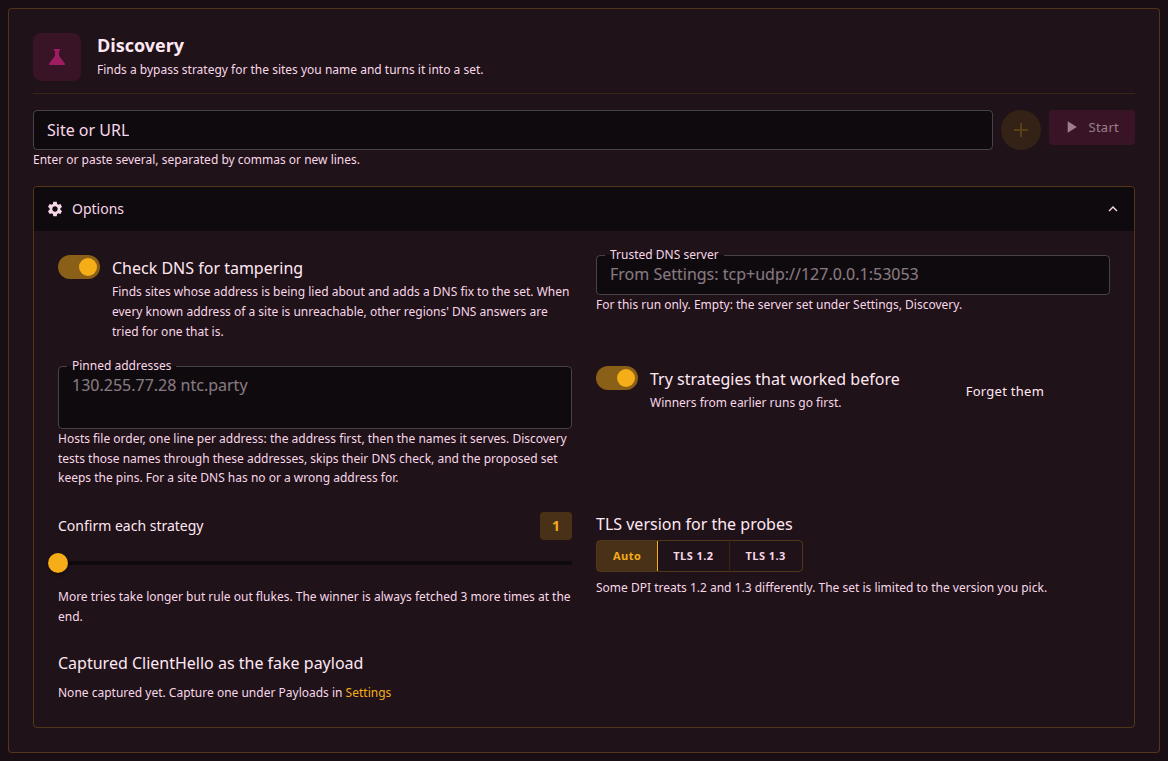
The options under the field change how the run probes, not what it looks for:
| Option | Effect |
|---|---|
| Check DNS for tampering | Before the strategies, each site's address from the system resolver is compared with the answer of a resolver Discovery trusts: the trusted DNS server, or else the public resolvers built into b4. A site whose resolver lies about its address gets a DNS fix written into its set, and a site whose addresses are all unreachable is searched for alternative addresses. Off, the run trusts the system resolver and does neither. |
| Trusted DNS server | The resolver the DNS check trusts, for this run only; empty uses the one under Settings, Discovery. The accepted forms and what goes into the set are described under Trusted DNS server. Unavailable while the DNS check is off. |
| Pinned addresses | Hosts file lines, the address first and then the names it serves, as in a set's pinned addresses. A pinned name is fetched through these addresses only, its DNS is not checked, and the proposed set keeps the pins. A run for a set, a watchdog heal included, also tests a name the set pins through the set's pins, unless the name is given here. When none of them accepts a connection and the DNS check is on, the name is checked as if it had no pins, the way the set itself falls back to the resolver; applying the result keeps the set's pins unless the run found other addresses for that name. A site that publishes no address in DNS, such as one reached through an address its operators publish elsewhere, is tested this way. |
| Stop at the first strategy that works for every address | Shown only while a set is picked, on by default. The search ends as soon as one strategy passes the confirmation on every address of the set together; see A run for a set. Off, every strategy is tested, which takes longer and can find a faster one. |
| Try strategies that worked before | Presets that won an earlier run are tried before the built-in list. Forget them drops that list. |
| Try community sets first | Shown while the Community Hub is on. The catalogue is refreshed and up to three published sets per site are tested after the remembered winners and before the built-in list; see Discovery and the catalogue. |
| Confirm each strategy | How many consecutive fetches a preset has to pass during the search, 1 to 5. Independent of the confirmation pass at the end of the run, which always fetches the winner three more times. |
| TLS version for the probes | Limits the fetches to TLS 1.2 or 1.3, and limits the created set to that version, since some DPI treats the two differently. Left on its default in a run for a set, the fetches follow the TLS version the set is limited to. |
| IP version for the probes | Same, for IPv4 and IPv6. Offered only while the capture engine handles both. |
| Captured ClientHello as the fake payload | Fake packets carry a ClientHello captured under Settings, Payloads, instead of the built-in payloads. |
A run
A run passes through six phases, shown as steps while it is in progress:
- DNS. Each site is resolved and its answers checked, unless the DNS check is off. A site whose known addresses do not serve it is also scanned for alternative addresses here. A pinned name skips this step.
- Without bypass. Each site is fetched with no strategy at all. A site that loads here through an honest answer is reported as needing no bypass and takes no further part in the search, though it is still fetched through every preset for comparison. A site that loads only once its DNS answer is corrected, or only through an alternative address, is reported as found with a set that changes no packets.
- Strategies. The remembered winners, then the 18 built-in opening presets, are applied one at a time and every site is fetched through each.
- Tuning. For every technique family that produced a working preset, its parameters are varied on the site that responded best to it, and the result is checked against all sites.
- Combining. When two or more families worked, presets that combine them are tried.
- Confirming. The winning preset of every site is rebuilt exactly as it would be saved as a set and fetched three more times. A winner that fails any of those fetches gives way to the next candidate.
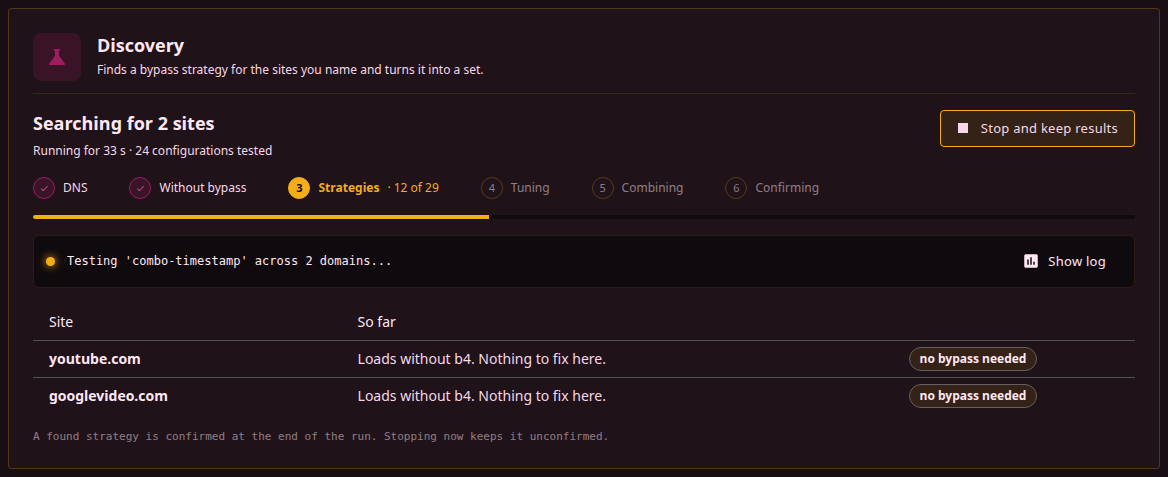
The panel shows the current phase, the time elapsed, the number of configurations tested so far, and the last line of the run's log; Show log opens the whole log. The bar under the steps measures the opening pass, where the number of tests is known in advance; from the tuning phase on it only signals that the run is still going, because how many tests those phases need depends on what the first phases found. One row per site says what has been found so far: a strategy with a one-sentence description, a count of presets tried, or that the site loads without b4.
The run can be cut short once the table shows enough. Stop and confirm ends the search at the current preset, skips the phases that remain, and goes straight to the confirmation phase for the winners found so far; the skipped steps are marked as such. Such a result is confirmed like any other, but not tuned, so a faster strategy may exist. Before anything has been found the button reads Stop and does the same, ending the run with nothing to confirm. During confirmation, whether reached this way or at the end of a full run, the button reads Stop now and ends the run at once; whatever has been found is kept and written to history, marked as not confirmed. A run the watchdog started to heal a set is shown the same way but cannot be stopped from this page.
Only one run can be in progress at a time. The watchdog shares the same runtime: a heal that comes due while a run started here is in progress waits for it, and a run cannot be started here while a heal is in progress. A firewall refresh started while a run is active waits for it to finish. After a run ends, the queue and rules it used are released, which takes a few seconds; the page reports that and enables Start when it is done.
A run for a set
A run started for a set tests the set's addresses as one group and ends with one verdict for the whole set, shown as a card above Results per address. It differs from an ordinary run in three ways.
The set's own strategy is tested first. Right after the fetch without bypass, every address is fetched through the set's current TCP, fragmentation and fake packet settings, tested alone and listed as Current strategy of the set. Remembered winners, community sets and the built-in presets follow.
A strategy that loads every address is confirmed on all of them together. While Stop at the first strategy that works for every address is on, a strategy that has loaded every address during the search is rebuilt as the set would carry it, and each address is fetched three times through it, all in one configuration, the way the set would run on the router. When every fetch passes, the search stops there, the remaining phases are skipped, and the result panel says so. A strategy that fails any of those fetches is dropped and the search goes on. After three strategies have failed this confirmation, the run no longer stops early and completes the normal search. A run in which every address loads without bypass stops early as well. With the option off, the search runs to the end and the joint confirmation happens only afterwards.
The verdict covers the set, not a site. A run that completes without stopping early confirms up to three strategies that loaded every address in the same joint way, and the first to pass decides the verdict:
| Verdict | Meaning | What the card offers |
|---|---|---|
| one strategy covers every address | One strategy passed the joint confirmation, three fetches out of three on every address. | Apply to <set> writes it into the set, by the rules under Writing into an existing set. Addresses that also load without b4 are named. |
| current strategy works | The set's own strategy, tested alone, passed on every address, so there is nothing to write. | For sites that still fail in a browser, the card names the addresses that another set handles and those the set does not match at all, since the set's strategy does not apply to them, and notes that the browser may use QUIC (HTTP/3) or IPv6, which Discovery does not test. |
| covers some addresses | No single strategy works for every address. The card lists the addresses the best strategy covers and those it does not. | Apply to <set> anyway writes it with a warning that the set may stop opening the uncovered addresses. Remove them from this set's Discovery addresses drops the uncovered ones from the set. The per-address cards below can create a separate set for them. Apply is not offered when the best partial result is the set's own strategy or only an address or DNS fix. |
| no bypass needed | Every address loads without b4. | Nothing to apply. Such addresses cannot show whether the set works; pages that do not open without b4 are the ones to test. |
| nothing worked | No strategy loaded the addresses that need a bypass. | The per-address cards show what happened to each address. Addresses that had nothing to test are named, and Remove them from this set's Discovery addresses drops just those. |
| stopped before a result | The run was canceled. | Nothing to apply. |
When the set's own strategy loads every address only together with a DNS redirect or an alternative-address pin that the set does not have, the verdict is one strategy covers every address rather than current strategy works, so that applying it writes the missing DNS part into the set.
An address whose name does not resolve is never covered, so a set that lists one gets covers some addresses at best. The card names such addresses, and Remove them from this set's Discovery addresses drops them.
The last run of each set is kept and shown in the set's Discovery tab.
The watchdog heals a watched set with this kind of run: the DNS check is skipped, the set's current strategy is tested first, and the search stops at the first confirmed cover. Only the verdict one strategy covers every address is written.
Results
Every site the run was given gets one verdict. In a run for a set, these cards appear under Results per address, below the set verdict.
| Verdict | Meaning |
|---|---|
| Strategy found | Something made the site load: a preset, a corrected DNS answer, or an alternative address. The card names the winner, describes it in a sentence, and lists what the set would do. The badge says whether the confirmation pass succeeded. |
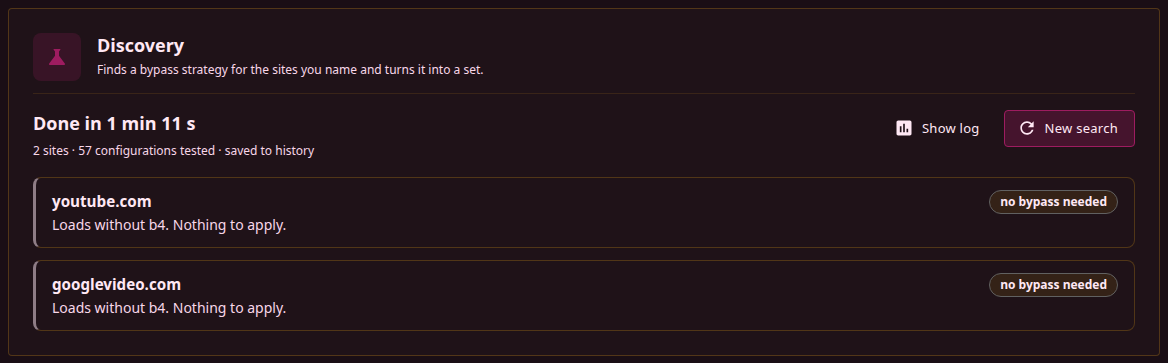
| No bypass needed | The site loaded without any strategy through the address its resolver gave. There is nothing to apply, and a set for it would only push its traffic through packet changes it does not need. |
| Address blocked | Connections to every known address of the site fail before any TLS is spoken, and no other region's DNS answer reached it either, so no packet strategy can help. Such a site needs a set routed through a proxy or VPN. |
| Intercepted by the gateway | The TCP handshake to the site's addresses is answered by the first hop in front of this host, not by the site: a SYN sent with a hop limit of one, which nothing beyond the first hop can answer, gets a reply. A transparent proxy on that gateway carries the connection, so no packet strategy from this host reaches past it, and the run stops after the DNS phase when every address is served that way. Behind another router, b4 has to run on that router or this host has to be excluded from its redirect; when b4 is the router itself, the ISP does this at its edge and only a set routed through a proxy helps. When another region's DNS answer gives an address that routes normally, the search goes on with that address instead. |
| Does not resolve | No resolver has an address for the site's name, as with a misspelled or expired domain, so there is nothing to connect to and no strategy can be tested. The verdict is reached when the fetch without bypass fails on the lookup of the name itself, and the system resolver, asked again for IPv4 and IPv6 addresses, answers that the name has neither. When that second lookup fails instead of answering, the verdict needs Check DNS for tampering on and a DNS phase that found no address either: not from the system resolver, DNS over HTTPS, plain DNS or other regions' answers. A name the DNS phase found an address for never gets this verdict, whatever the system resolver answers. Such a site is left out of the rest of the run, and a run with no site left to test stops there. An NXDOMAIN answer from DNS over HTTPS or the trusted DNS server is reported as a name that does not exist, and the search for alternative addresses is skipped for it. An answer that the name exists without an address of the probed family is reported as such: a site that publishes its address elsewhere is tested by giving that address under Pinned addresses. A name with addresses of one IP family only, probed by a run limited to the other family, gets the verdict with the missing family named, since nothing can be tested over the probed family. The DNS check queries a name as typed, so for an internationalized name such as a .рф domain only the system resolver's answer for its ASCII form (xn--...), which the probes connect to, counts. |
| Nothing found | Every preset failed. The log shows how each one failed. Running again with TLS 1.2 or a captured ClientHello sometimes changes the outcome. |
Sites that share one winning preset are shown together on one card, since applying it creates a single set targeting all of them. The card is built from the set itself, with the same rows the Sets page shows: the split strategy and its parameters, the fake packets, the targets, and what happens to DNS. Below it, N other strategies worked lists every other preset that loaded the site, fastest first, each with Use instead, followed by the confirmation count and speed per site and how many of the tested configurations loaded the pages. The winner is the fastest of them on a single fetch, which is a noisy measure; a preset from that list is as valid a choice.
Applying
Apply as a set on a result card, Apply in the history and Use instead on an alternative all open one dialog, with the set previewed row by row. It offers up to three ways to use the result:
| Choice | Effect |
|---|---|
| Write the strategy into an existing set | Replaces the bypass strategy of a chosen set and leaves the rest of it alone. See below. |
| Create a new set | Creates a set from the result. See Creating a set. |
| Add to <set>, which already uses the same strategy | Offered when an enabled set carries an identical strategy. The sites are added to that set instead of creating a new one. |
Writing into an existing set is the default when the run was for a set, or when a set lists the site exactly; otherwise the dialog starts on creating a new set. Writing into the set that handles the site replaces its strategy in place, so another strategy can be tried without a second set for the same site.
Writing into an existing set
Which set to change lists the set the run was for, followed by every enabled set without routing that already matches the site: by listing it exactly, through a parent domain, through a GeoSite category, or through a regexp: entry. Each entry says why it is offered. Another set opens a picker over every other set without routing, disabled ones included.
Only the bypass strategy is written:
| Part of the set | After the write |
|---|---|
| TCP | Taken from the result, except the port filter and RST protection, which the set keeps. IP block detection stays as the set had it, unless the result turns it on. |
| Fragmentation and fake packets | Taken from the result. |
| UDP and QUIC | Unchanged. Discovery fetches over TCP and never tests QUIC, so it has nothing to say about the UDP settings. |
| DNS redirect | Changed only when the result uses a DNS redirect. The set's own pins are kept. |
| DNS pins | A pin the result carries for a domain replaces the set's pins for that domain. Pins for other domains stay. |
| Targets, name, routing, escalation | Unchanged, including the TLS and IP version filters. |
| Discovery addresses | Unchanged, unless Use these addresses as the set's discovery URLs is checked. |
No domain is added to the set and none is taken from another set, with one exception. When the chosen set does not match the tested sites, Add <sites> to this set appears, checked. Left checked, the sites are added to the set's domains and moved out of other enabled sets that list them, as when a new set is created. Unchecked, only the strategy is written, and the dialog notes that the strategy does not apply to those sites.
The dialog also warns when the chosen set matches a site but another set actually handles it, because that one has a more specific entry or comes earlier in the list: the new strategy has no effect on that site until this changes. A disabled set gets a note that the strategy takes effect once the set is enabled.
Use these addresses as the set's discovery URLs stores the addresses of the sites this result is for (on a set verdict card, every address of the run) as the set's Discovery addresses, replacing the ones it had; the caption says how many it replaces. It starts checked when the set has none. A set linked to the Community Hub keeps its link and shows as edited once its strategy is replaced.
Apply to <set> on a set verdict card opens a shorter dialog for the same write into the run's set. It never adds domains, and it warns when the strategy did not work for some of the set's addresses.
Creating a set
The suggested name is the site without its prefix and its top-level domain, instagram for www.instagram.com, with a suffix when the run was limited to a TLS or IP version. For a single site, the match can be shortened to a parent domain so that the set also covers subdomains. Creating a new set moves the site out of any enabled set that lists it, since a domain listed in two enabled sets is handled by whichever comes first in the list.
The created set goes to the top of the list and is enabled at once. Its targets are the sites named, plus any geosite or geoip category b4 associates with them through its built-in CDN table, when the corresponding database is installed. The addresses learned during the run are not carried over, so the set matches by server name. A DNS redirect is included only for a site whose resolver was found to be lying, and a pin for a site that needed an alternative address, for a name given under Pinned addresses, and for a site whose resolver lies when no resolver a set can use returns its address. The check addresses of the sites the set is created for become its Discovery addresses, so the set can be searched again, or watched, on the same pages.
A history entry keeps the set the run built and the sets of the strategies that also worked, so a result can be applied, and another strategy tried in its place, without running Discovery again. The confirmation state travels with it.
Alternative addresses
Some blocks are not about the domain name at all: the resolver hands out an address that refuses every connection, while the same site answers from addresses handed out to clients elsewhere. When every known address of a site fails, or the reference answers fail the TLS handshake, the DNS phase asks a public resolver, through EDNS Client Subnet, how clients in some five hundred other /16 networks are answered for that name. The addresses that come back are checked for a TCP connection, then the fastest of them for a TLS handshake with the site's name.
An address that completes the handshake is one the block does not cover. The site is fetched through it during the run, and the set pins the name to it, so that devices are answered with that address instead of the blocked one. When several addresses qualify, up to three are pinned. An address that accepts the connection but not the handshake is filtered by name like any other, so it is used as a probe target only when the site's own addresses refuse connections outright, and the packet strategies are searched on it.
A site whose resolver lies and for which no resolver a set can use returns the correct address gets the addresses DNS over HTTPS or the trusted DNS server gave pinned the same way, and the run log names them.
A set with pins, or built for a site whose addresses were blocked, gets the IP block detection of its TCP tab switched on: a pinned address that stops answering is left out of DNS answers, and when all of them are gone the query is passed to the resolver. The list of addresses is fixed at the time of the run; when the block moves, a new run with the DNS check on finds new ones, a run for the set once none of its pinned addresses accepts a connection. Runs the watchdog starts skip the DNS check, so they do not refresh pins.
A probe made from a machine where b4 is already running goes through b4's own sets. A TLS check that passes there measures the bypass, not the network. Discovery's own probes skip the sets, so its verdict on an address is the raw one; a third-party tool run on the router only agrees with it while every set covering the site is disabled.
History
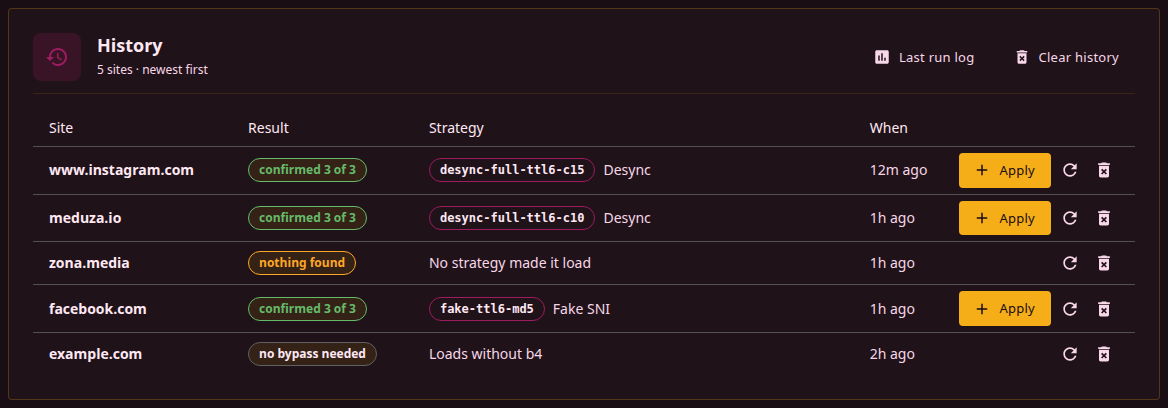
The last hundred results are kept, one entry per site, the newest run for a site replacing the older one. Every entry shows its verdict, the winning preset with its technique family, the sentence describing it on hover, and when it ran. Sites from one run that won with the same preset share one set; each of them says so, and applying either installs the set for all of them, named after the site that was clicked. Apply installs the set the run built, the refresh button starts a new run for the site, and an entry can be removed on its own or the whole history cleared.
A row that came from a run for a set carries that set's name. Its refresh button starts a new run for the set with the set's current Discovery addresses, as long as the set still exists without routing and has addresses; otherwise it runs the row's site alone.
An entry also keeps the strategies that worked but lost to the winner. The twelve fastest of them are stored with the set each one builds; the entry expands to that list, fastest first, with the technique family and the speed measured during the run, and Use instead applies one of them exactly as Apply applies the winner. The remaining presets of the run stay in the entry as results without a set, and entries written before b4 kept alternatives hold the winner alone.
A strategy that has been installed as a set is marked Tried, on the winner and on the alternatives alike, whichever page it was applied from. The mark records the attempt rather than the current configuration: it stays after the set is deleted and survives a new run for the same site, so a site that has been through a dozen strategies still shows which ones were tried.
Under the time of the run, each row shows what its entry costs in the history file. The stored sets are most of that, which is why only the twelve fastest keep one: a site that found many working strategies costs tens of kilobytes, freed by removing the entry or clearing the history.
Beside the per-site entries, the history file keeps the last run of each set with its verdict, one record per set for up to 64 sets; when a run for a 65th set finishes, the oldest record is dropped. That record is what the set's Discovery tab shows under Last search for this set. Clearing the history clears these records as well.
The log of the last run stays available under Last run log and survives a restart of the service; the log dialog can also download it as a text file, during a run or after it.
The watchdog runs Discovery on its own. For a set whose watchdog is switched on in its Discovery tab, it checks the set's addresses, runs Discovery for the set when they keep failing, writes a confirmed strategy into it and undoes the change if the addresses still fail. Domains on the older per-domain list are healed through whichever set lists them.