Discovery
Settings, Discovery has two cards. Testing Configuration holds the timings and the trusted DNS server of Discovery runs. Watchdog holds the global switch, the timings of the watchdog and the older per-domain list.
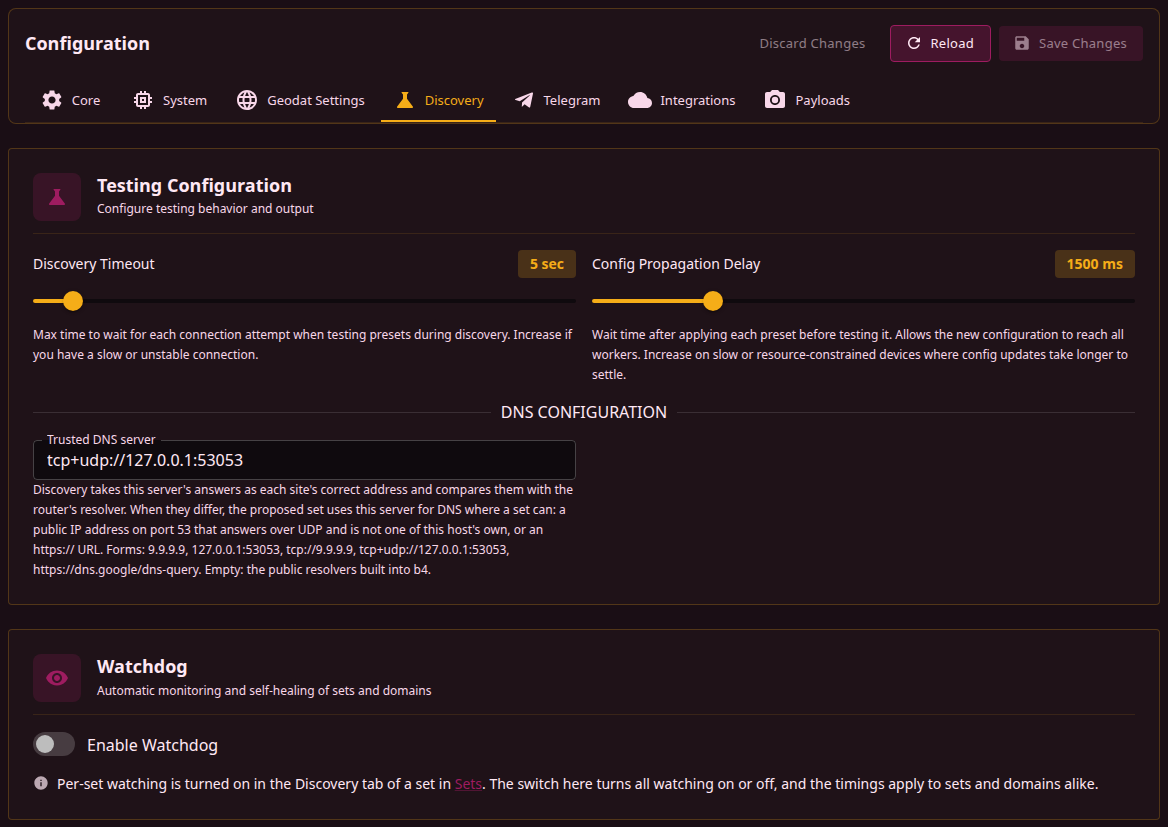
Changes are saved with Save Changes in the page header, see Saving and restarting. None of them needs a restart. A change applies to the next Discovery run, not to one in progress. The watchdog applies the switch within 10 seconds; a check or a cooldown already scheduled keeps its time, and the new timings apply to what is scheduled after it.
Testing Configuration
| Field | Effect | Range | Default |
|---|---|---|---|
| Discovery Timeout | Time limit for one fetch of a site through one of its addresses, from the connection to the end of the read. Each address a fetch tries gets the whole limit. The limits of the DNS phase's queries and connection checks are based on the same value. | 3-30 sec | 5 sec |
| Config Propagation Delay | Pause between switching the run's capture queue to a new configuration and the first fetch through it. A run pauses this way after loading each preset and before the confirmation fetches. The watchdog waits the same time after a heal writes a strategy into a watched set, before checking the set's addresses. | 500-5000 ms | 1500 ms |
How many fetches in a row a preset has to pass is not set on this tab. It is chosen for each run with Confirm each strategy under Options.
Each speed in Discovery's results comes from one fetch of at most 100 KB, timed from the start of the request, connection and TLS handshake included. The figures compare strategies on the same site and are not a measure of the connection's throughput.
Trusted DNS server
Trusted DNS server sits under DNS Configuration on the card. With Check DNS for tampering on, Discovery compares each site's address from the router's resolver with the address from a resolver it trusts, to tell whether DNS hands out a wrong one. Trusted DNS server names that resolver. Empty, Discovery asks the public resolvers built into b4: DNS over HTTPS first, then plain DNS. Runs with Check DNS for tampering off skip the DNS phase and do not ask the server; every heal the watchdog starts is such a run.
| Form | Transport |
|---|---|
9.9.9.9, 2620:fe::fe, 127.0.0.1:53053, udp://9.9.9.9 | Plain DNS over UDP, asked again over TCP when the answer is truncated |
tcp://9.9.9.9 | Plain DNS over TCP only |
tcp+udp://127.0.0.1:53053 | UDP first, TCP when UDP fails |
https://dns.google/dns-query | DNS over HTTPS; /dns-query is added when the URL has no path |
The port defaults to 53. Plain DNS needs an IP address: a host name works only in an https:// URL. DNS over TLS and other transports are not supported directly; a local DNS proxy that speaks them covers them when its address is given here.
A server named here is the only reference. Its answers are taken as each site's correct addresses, its NXDOMAIN as a name that does not exist, and no public resolver is asked beside it. Before a run starts, the server is asked once about one of the names the run checks; when no answer comes back, or the server refuses the query, the run stops with an error. An error answer about that name, such as SERVFAIL, does not stop it, and a run whose names are all pinned does not ask. A server that stops answering later in the run leaves the site it was asked about without a DNS comparison.
When the router's resolver gives a site a wrong address, the proposed set gets a DNS fix, the first that works of:
- the trusted server itself, when a set can use it: a public IP address on port 53 that answered over UDP and is not one of this host's own, or an
https://URL; - a built-in DNS-over-HTTPS server that returns the site's correct address;
- a built-in plain DNS server that does so, asked plainly and then with the query fragmented;
- the addresses DNS over HTTPS or the trusted server gave, pinned in the set, when no resolver a set can use returns them; an answer from the built-in plain DNS servers is never pinned, since it can be forged on the way.
A trusted server a set cannot use, such as a local proxy on another port, a resolver on the local network or a tcp:// server, still decides which addresses are correct, and the run log says why it did not go into the set. A resolver on the local network stays out because a set's DNS redirect forwards that resolver's own upstream queries unchanged only when they come from the very address the set names, see Resolver types, and hands its queries from any other address back to it. An https:// URL goes into the set as it is, wherever its server runs.
The same field is in the options of a Discovery run, where it applies to that run only.
Watchdog
The Watchdog card holds the global switch Enable Watchdog, off by default. It turns all watching on or off, for watched sets and for the older per-domain list alike, and the timings below apply to both. Turning the switch off cancels a heal whose search is in progress, and that heal writes nothing. A set waiting in the heal queue returns to Queued and is checked again once the switch is back on.
The other fields show only while the switch is on:
| Field | Effect | Range | Default |
|---|---|---|---|
| Check Interval | How often each watched set or domain is checked while healthy | 60-1800 sec | 300 sec |
| Failure Re-check Interval | How often a set or domain is checked again after a failed check | 10-300 sec | 60 sec |
| Healing Cooldown | Pause after a heal attempt before the next check of that set or domain | 60-3600 sec | 900 sec |
| Check Timeout | Time limit for one check fetch, the checks after a heal included | 3-30 sec | 15 sec |
| Max Retries | Failed checks in a row that queue a heal | 1-10 | 3 |
The checks, the heal and the statuses are described on the Watchdog page. Two more watchdog values exist only in the configuration file, see Parameters.
Older per-domain list
Older per-domain list holds domains checked one by one, each healed through whichever set lists it at the time; see Older per-domain list. A domain is added with Add Domain and removed with the cross on its chip. An entry is a domain, checked as https://<domain>/, or a full URL, checked as given. The same list is edited in the Older domain list section of the Watchdog page.
A set is put under the watchdog in its own Discovery tab, with Keep this set working with the watchdog. Its Discovery addresses are then checked together and a heal writes into that set only. Enable Watchdog still has to be on for any set to be checked.