MCP server
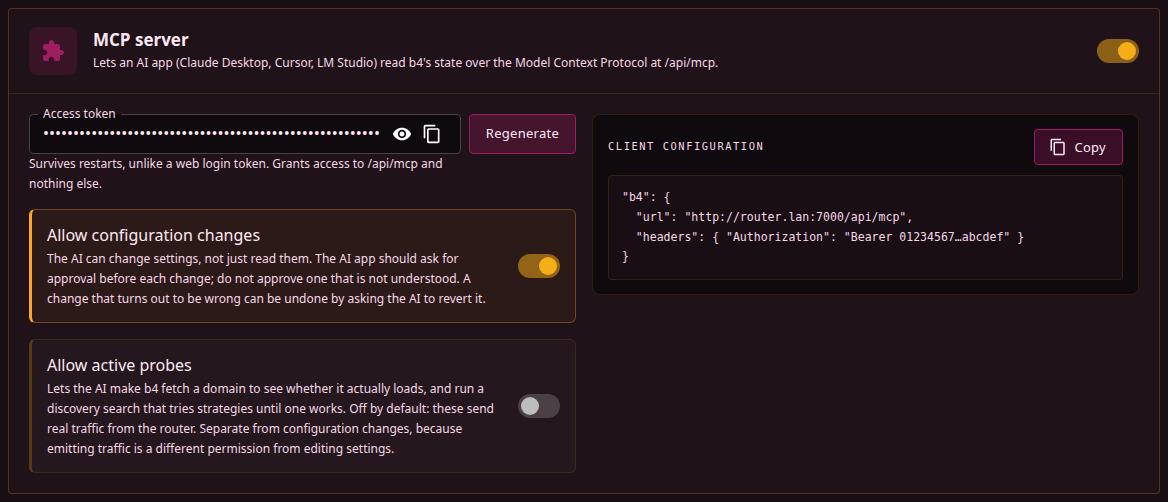
An external AI application reads b4's state over the Model Context Protocol and answers questions about it: which set matches a domain, whether traffic reached b4, what the log says. Claude Desktop, LM Studio, Cursor and Jan all speak it.
The model runs inside that application. b4 contacts no AI provider and needs no API key.
Configured in Settings, Integrations, MCP server.
Fields
| Field | Description |
|---|---|
| Enable MCP server | The switch in the card header. Serves the endpoint at /api/mcp. Off by default. The rest of the card is shown only while it is on. |
| Access token | The credential AI applications present. The value is masked, with buttons to reveal and copy it. Generate fills in a new token; once a token is set, the button reads Regenerate and replaces it. A token can also be typed or pasted in. See Token. |
| Allow configuration changes | Lets the AI change settings as well as read them. Off by default. See Changing settings. |
| Allow active probes | Lets the AI fetch a domain from the router to see whether it loads, and run Discovery to find a working bypass strategy. Private and local addresses are refused. Off by default, and a separate permission from Allow configuration changes. |
| Client configuration | A server entry named b4, with the endpoint URL and the Authorization header, to paste into the AI application. The URL is the address the web interface is open at, followed by /api/mcp. A long token is shown shortened; Copy puts the entry on the clipboard with the full token. While the token field is empty, <token> stands in its place and a notice below the entry names the fallback described under Token. |
The endpoint uses the web server's port, TLS certificate and bind address. With the web server disabled (port 0) it is unreachable, and b4 logs a warning at startup. With the web server's Expose to internet on, the endpoint is reachable from the internet along with the interface.
Token
Generate produces a 64-character token. It is not stored until the configuration is saved.
While a token is set it is the only credential accepted at /api/mcp. It grants nothing else: no other API route accepts it as a credential.
With the field empty, the endpoint falls back to web-interface authentication. A web login token expires after a day and is discarded on every restart, so an AI application configured with one loses access within a day, or at the next restart. An MCP token keeps working when b4 restarts.
The token is sent in a header on every request. Without HTTPS anyone on the network path can read it and reuse it, so it stays private only while the port is confined to a trusted network.
With the token field empty and no username and password set under Settings, System, Web Server, anything that can reach the port can read b4's status, configuration and diagnostics.
Connecting an application
Two values are needed: the endpoint URL and an Authorization: Bearer <token> header.
VS Code reads .vscode/mcp.json in the workspace, or the user-level mcp.json:
{
  "inputs": [
    {
      "id": "b4-token",
      "type": "promptString",
      "description": "b4 MCP token",
      "password": true
    }
  ],
  "servers": {
    "b4-asuswrt": {
      "type": "http",
      "url": "https://192.168.1.1:7000/api/mcp",
      "headers": {
        "Authorization": "Bearer ${input:b4-token}"
      }
    }
  }
}
LM Studio uses the same file with a different top-level key and no type:
{
  "mcpServers": {
    "b4-asuswrt": {
      "url": "https://192.168.1.1:7000/api/mcp",
      "headers": {
        "Authorization": "Bearer <token>"
      }
    },
    "b4-local": {
      "url": "http://localhost:7000/api/mcp",
      "headers": {
        "Authorization": "Bearer <token>"
      }
    }
  }
}
Each entry appears in the Integrations panel as mcp/<name> with a toggle beside it. Several entries can be defined at once, for example a router and a local instance, and enabled independently.
The VS Code inputs block makes the editor prompt for the token instead of keeping it in the file. Applications without an equivalent hold the token in the file as plain text, and committing such a file puts the token into the repository history.
Only POST is served. GET and DELETE return 405, which is normal for this transport and not a fault.
Tools
| Tool | Answers | Example prompt |
|---|---|---|
b4_status | Version, capture engine, firewall backend, how many sets exist and are enabled, the state of the Telegram over WebSocket bridge, uptime, and the connections counted since the counters were last reset | "Is b4 running, and which capture engine is active?" |
b4_get_topic | What a setting does, its unit, its real default, and what a zero or empty value means | "What does the strict switch on a set's DNS actually do?" |
b4_geo_lookup | Which geosite or geoip categories exist, what one holds, and which of them cover a domain or an address | "Which geosite category covers rutracker.org?" |
b4_edit_set_targets | Adds or removes domains, addresses, geo categories, ASNs or source devices on one set | "Add rutracker.org to the video set." |
b4_test_domain_now | Fetches a domain through b4 and again with b4 bypassed, and says which of the two works | "Is rutracker.org actually loading right now?" |
b4_watchdog | The last verdict for every watched set and domain, and add/remove/enable/disable/check; with set, one set's own watchdog and its addresses | "Which of the sites you are watching are failing?" / "Keep the video set working with the watchdog." |
b4_manage_set | Creates, duplicates, moves, enables, deletes or resets a strategy set | "Make a new set for rutracker.org and put it last." |
b4_find_bypass_strategy | Runs discovery against a domain and turns the winning strategy into a set; with set, runs it for an existing set and writes a covering result into that set | "Find something that makes rutracker.org load." / "Find a strategy for the video set." |
b4_check_domain | Which sets target a domain, how the match was made, whether that set is enabled | "Is rutracker.org covered by any set?" |
b4_list_sets | Every set in priority order, with domain counts and primary strategy | "List the sets and how many domains each targets." |
b4_get_set | One set in full | "Show the full configuration of the set named video." |
b4_get_config | The configuration, or one section of it | "Show the DNS section of the configuration." |
b4_recent_connections | Connections b4 processed, with the set that matched each | "Has any traffic for youtube.com reached b4?" |
b4_logs_tail | The tail of errors.log, or of update.log with file=update | "Did b4 write anything to the error log?" / "The update broke it - what did the installer say?" |
b4_metrics | Connections in the last complete minute, in sets and not in a set, connections since the counters were last reset, dropped resets, blocked DNS lookups and connections, b4's CPU and memory use. Connections are counted as on the dashboard | "How many connections did my sets match in the last minute, and how much memory does b4 use?" |
b4_diagnostics | OS, kernel, interfaces, firewall backend and the rule groups b4 installed | "Are b4's firewall rules actually installed?" |
b4_list_writable_paths | Which settings can be changed, with types and accepted values | "What can you change about the video set?" |
b4_set_config_value | Changes one setting and applies it live | "Switch the video set to the extsplit strategy." |
b4_revert_last_change | Restores the configuration from before the last change | "That made it worse, put it back." |
A ready-made prompt named diagnose_domain is published alongside the tools. Applications that support prompts list it separately. It takes a domain and walks the model through status, coverage, configuration and firewall checks in order.
What is served depends on what is permitted
The tool list is built from the two permission switches and rebuilt whenever they change, with no restart. With both off, the AI is offered the reading tools alone; the tools that write settings or run a search are not advertised at all, so a model cannot attempt something it has not been permitted to do, and their descriptions take up none of the model's context.
| Permitted | Tools served |
|---|---|
| Nothing (default) | 13 |
| Allow configuration changes | 17 |
| Allow active probes | 15 |
| Both | 19 |
b4_watchdog is the one tool served at every level, because reading the watchdog's verdicts emits no traffic and changes nothing. Its actions are permitted separately. Without set, add, remove and check work on the older per-domain list, while enable and disable turn the global watchdog switch on and off, which covers the watched sets as well as the list. status always works and also lists the watched sets, remove and disable need Allow configuration changes, add and enable need Allow active probes as well, because each of them makes the router fetch a site, and check needs Allow active probes alone.
With set, a set id or exact name, it acts on that set's own watchdog and its Discovery addresses, passed as url:
Action with set | Effect | Needs |
|---|---|---|
status | The set's watchdog status, reason and per-address results | Nothing |
enable | Switches the set's watchdog on and schedules a check; refused when the set cannot be watched | Allow configuration changes and Allow active probes |
disable | Switches the set's watchdog off | Allow configuration changes |
add | Adds url to the set's Discovery addresses | Allow configuration changes and Allow active probes |
remove | Removes url from them | Allow configuration changes |
check | Schedules a check of every address of a watched set and clears its cooldown | Allow active probes; a give-up is cleared only when Allow configuration changes is on as well |
b4_find_bypass_strategy takes an optional set in the same form. action=start with set runs Discovery for that set: on the domains given, or on the set's Discovery addresses when none are, at most five, with the set's current strategy tested first and the search stopped at the first strategy confirmed on every address. action=status then reports the set verdict, and action=apply with set writes the result into that set, strategy only with its domains untouched, and only for the verdict covered. The same rule applies to action=apply without set when the run it addresses, by id or as the last run, was a run for a set. A set that action=apply creates for free-form domains keeps the addresses they were found on as its Discovery addresses. A set with routing enabled is refused. Starting a run needs Allow active probes; applying needs Allow configuration changes.
The server also tells the AI which of the two it has, so it says "here is what I would change" rather than offering to change it. That message names the setting to turn on, which is how a model can answer "why can't you?".
What b4 records about MCP
Every tool call writes one line to b4's log, visible under Logs in the web interface: the tool, the caller's address and how long it took. A call that is refused is logged at warning level instead, so a model reaching for something it has not been permitted to do stands out from ordinary use.
A request turned away at the endpoint is also logged: the server being off, a wrong or missing token, or a browser page whose origin is not allowed. The token itself is never written, presented or configured. Repeated refusals are collapsed into one line every 30 seconds with a count, so a client guessing at the token cannot push everything else out of the log.
These lines go to the log stream the interface shows and to the console. They are not written to errors.log, which holds errors only.
A change made or reverted through MCP also appears under Recent changes on the dashboard as AI agent changed a setting, with the path of the setting and without its value.
Grounding
Several b4 settings have names that read as something other than what they do, and a zero usually means "use the fixed value" rather than "off". b4 ships a written description of each one, and the model is told to read it before explaining or changing anything.
The same descriptions are published twice. The tool b4_get_topic takes topic for an exact key, path for the setting a b4_set_config_value path names, or query for a search. In a path such as sets[video].tcp.win.mode the set is ignored. Calling the tool with no arguments lists every documented key. The b4://topics/<key> resources hold the identical text.
Most applications never show resources to the model: LM Studio and the OpenAI-compatible bridges list them for the user, not the assistant. The tool makes the same text reachable for the model.
Asking about a setting that has no description yet returns a note saying so, along with the documented settings nearby. The note tells the model to say it is unsure rather than infer the setting's unit, default or meaning from its name.
b4_check_domain answers whether a domain is configured in a set. b4_recent_connections answers whether traffic for it arrived and which set matched. A domain can be configured and still see no traffic, which is what separates a targeting mistake from a routing one.
What is stripped
Tool output may be forwarded to a third-party model, so b4 removes these values from it or replaces them with [redacted]:
- the username and password of the web interface;
- the MCP token itself;
- the SOCKS5 username and password;
- the names and values of the MTProto secrets;
- the IPinfo token;
- the reference to the stored AI API key;
- the username and password of a set's upstream proxy;
- the path of the web server's TLS key.
The tools return host names and URLs as they are configured. Download safe copy on Settings, System, Backup masks those as well: the host names of the router and the relays, and credentials inside URLs.
b4_diagnostics contains no credentials, but it reports the hostname, every interface address and the live firewall ruleset. That is enough to identify the network it came from.
Changing settings
With Allow configuration changes off, nothing the AI does can alter b4. With it on, these become writable:
- every setting inside a strategy set: targets, fragmentation, faking, TCP and UDP, DNS, escalation and routing
- the MTProto and SOCKS5 subsystems, the Telegram over WebSocket switch
system.mtproto.bridge.enabledamong them - the logging settings, so the AI can raise the log level, reproduce a problem and read the result back
b4_list_writable_paths reports the exact paths with their types, current values and accepted values, so a model does not have to guess one.
Refused whatever this setting is on:
| Refused | Reason |
|---|---|
| All credentials | Web, SOCKS5, MTProto, a set's upstream proxy |
| Web server settings | Moving or locking the interface removes the way to undo the change |
| The MCP settings themselves | The AI cannot widen its own permissions |
| Packet capture engine and TUN | Switching it underneath a live network can cut the machine off |
| Firewall backend | A wrong value leaves the machine with no rules at all |
| Every Expose to internet switch, and any write that would open a port while one of them is on, such as turning the MTProto proxy on or changing its port or bind address | An open port is reachable from the whole internet at once, and a revert does not undo what reached it |
| Packet marks, routing tables | Load-bearing for b4's own traffic |
| A set's id | Escalation targets refer to it |
| A set's Discovery addresses and watchdog switch | Both make the router fetch sites on a timer; b4_watchdog with set changes them under its own permissions |
| The log directory and the geo file locations | Filesystem locations, not contents: a wrong log directory silently stops file logging, and a wrong geo path empties every geosite category at once |
Only the locations are refused, never the contents. b4_logs_tail reads both log files whatever the directory is set to, without being able to move either somewhere it cannot find. system.logging.level does not change what reaches errors.log, which receives only errors at any level. Raising the level adds detail to the console and the web interface's live log view, which MCP does not read.
A wrong value inside a set breaks some sites, which is visible and reversible. A wrong web server port or capture engine can leave the machine unreachable with no way back in. Everything in the second group stays refused.
The writable areas are named as whole subtrees in the binary and the exclusions inside them are marked on the fields themselves, so a setting added to b4 later is unwritable until someone opts it in.
A change goes through the same validation and live-apply path as the web interface. An invalid result is rejected and nothing is saved. An accepted change takes effect at once, including the firewall rules when enabling a set alters which ports b4 intercepts. The tool reports the previous and the new value.
Writing a set's domains replaces the whole list. A model should read the current value and send it back in full, and the previous value is reported so the change can be undone.
b4_edit_set_targets adds and removes single entries instead, with kind naming the list: sni_domains, ip, geosite_categories, geoip_categories, asns or source_devices. An asns entry is written as AS15169 or 15169 and stored as the bare number; reserved numbers are refused. An ASN whose prefixes b4 has not fetched yet is added anyway and fetched at once, and the reply names it, because until the fetch succeeds the set matches none of its addresses. The prefixes and their refresh are described under ASN.
Undoing a change
b4_revert_last_change restores the configuration as it stood before the most recent change and applies it live. Repeating it walks further back, one change at a time.
The history is held in memory and covers only changes made through MCP since b4 last started. Edits made in the web interface are not part of it, and a restart clears it.
An undo is refused, and the change stays on the list, in two cases:
- the configuration was changed after the change being undone, by a watchdog heal, the web interface or another tool: restoring the older copy would overwrite that newer change as well;
- the undo would switch a set's watchdog or the global watchdog on, or bring back watchdog domains or Discovery addresses of a set whose watchdog is on, while Allow active probes is off, since the watchdog would then start fetching those sites on a timer. Discovery addresses of a set whose watchdog is off are restored without it, because nothing fetches them.
The model has the previous value in the tool's reply, so within the same conversation "that made it worse, put it back" is enough.
Browser origins
Requests carrying an Origin header are accepted only when that origin is b4's own address written as an IP address or localhost. This stops a visited web page from reaching b4 through the browser. AI applications send no Origin header and are unaffected.
Matching the origin against the address the request was sent to would not help. Under DNS rebinding the attacker owns the name: a page loaded from evil.example keeps working while the attacker re-answers that name with b4's address, so the browser sends Origin: http://evil.example alongside Host: evil.example and the two agree. What the attacker cannot do is serve a page whose origin is an address they do not control, which is why only literal addresses are accepted automatically.
Reaching b4 from a browser by hostname therefore needs that hostname listed in allowed_origins, which has no field in the web interface and is edited in the configuration file. A single * accepts any origin and disables the check.