Targets
The "Targets" tab defines which traffic the set applies to. Traffic is filtered by domains, IP addresses, GeoSite/GeoIP categories, ASNs, and source devices.
TLS version filter
The Bypass Domains tab has a TLS Version Filter with the options Any (the default), TLS 1.2 and TLS 1.3. The version compared is the highest one the client's ClientHello offers.
For a match by domain the filter is a preference. Among the sets that match the server name, a set whose filter fits the version is chosen first, and when none fits, the set is chosen as if no filter were set. For a match by IP address, GeoIP category or ASN, a set whose filter does not fit the version does not take the connection.
Domains
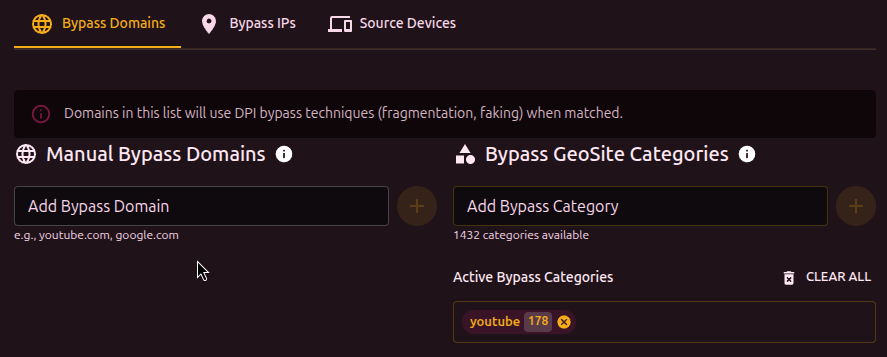
Domains are typed in by hand, and the Enter key adds the typed domain to the set.
- Multiple domains can be added separated by commas or newlines
- Duplicates with another set trigger a warning
- The Edit List button opens a text editor (one domain per line)
GeoSite categories
Instead of adding domains one by one, a set can take a category from the GeoSite database. Each category contains hundreds or thousands of domains (for example, youtube, discord, google).
To use GeoSite, the database must be loaded (Settings, Geodat Settings).
Clicking a category shows the list of domains it contains.
IP addresses
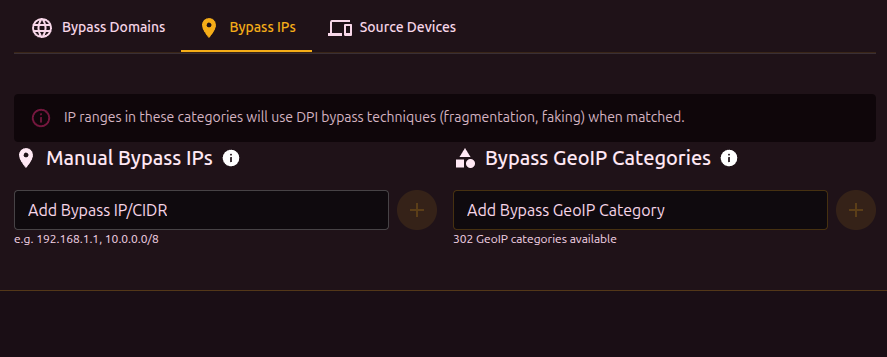
Manual entry of IPs or CIDR ranges (for example, 10.0.0.0/8, 192.168.1.100).
Works the same way as domains: bulk editing supported, duplicates warned.
GeoIP categories
The GeoIP equivalent for IP ranges. Categories are keyed to countries and ASNs.
ASN
An ASN (autonomous system number) identifies a network on the internet: AS15169 is Google, AS13335 is Cloudflare. An ASN target makes the set match every address range that network announces, without the ranges being listed by hand, and b4 keeps the list current as the network adds and withdraws ranges.
The ASN tab accepts a number (15169), the same number with its prefix (AS15169), or an IP address. For an IP address b4 looks up the network that announces it and offers that ASN, or each of them when more than one network announces the address. Adding an ASN resolves it first, so its row shows the holder name, the number of prefixes (IPv4 / IPv6), the approximate number of IPv4 addresses and the time of the last update. When the resolve fails, the error is shown and the ASN can still be added: b4 keeps trying in the background.
Each row can refresh the prefixes, show the full prefix list and remove the ASN from the set. An ASN whose prefixes are not known yet is shown with a warning and the last fetch error, if there is one. The tab label shows the number of ASNs in the set.
Numbers that never identify a public network are refused with an error: 0, 23456, the documentation, private and reserved range 64496-131071, and everything from 4200000000 up.
Where the prefixes come from
The configuration stores only the number, without the AS prefix: "asns": ["15169"]. The prefixes are fetched by b4 itself from RIPEstat, the RIPE NCC data service: the prefixes the ASN originates as seen by the RIS route collectors, with announcements seen by only a few collectors filtered out. Private, reserved and documentation ranges and default routes are dropped, a prefix inside a wider one is dropped, and two adjacent halves of a larger prefix are merged into it. The browser never contacts RIPEstat.
The result is kept in asn_cache.json in the directory of the configuration file. The file is shared by every set that names the ASN and by every browser; the ASN labels on the Traffic page come from it as well. A file that is not valid JSON at start is moved aside to asn_cache.json.corrupt, and the ASNs the sets reference are fetched again.
Refresh
| Event | What happens |
|---|---|
| b4 starts | Loading asn_cache.json makes no network request, and the sets use its prefixes as they are, however old, so after a reboot without internet access the sets keep matching the last known prefixes. The background check below runs right after start. |
| Right after start, then every hour | A background check fetches each ASN referenced by any set, enabled or not, whose entry is missing or older than 20 hours. ASNs are fetched one at a time. |
| A set gains an ASN that has no prefixes yet | The check runs at once. |
| A fetch fails | The last good copy stays in use. The next attempt follows after 30 seconds, and the wait doubles with every further failure up to one hour. |
| The prefixes changed | Every set that references the ASN is expanded again and the firewall rules are refreshed. |
An answer with no prefixes is refused. An answer that covers less than half the address space known before, counted in IPv4 addresses or in IPv6 /64 networks, is taken only after three fetches in a row, an hour apart, return the same shrink; until then the previous list stays in use, so a gap in the RIPEstat data does not empty a set. The refresh button in the set editor follows the same rule: it keeps the previous list and reports the shrink, and only the background check can accept it.
Before the first resolve
An ASN with no cached prefixes contributes no addresses, and the set does not match that network's traffic until the first fetch succeeds. The set editor and the set card show such an ASN as unresolved. A set whose domains, addresses, categories and ASNs all resolve to nothing matches nothing: it does not start acting on every connection to its ports, its MSS clamp is not installed, and its routing rules are installed once a target resolves.
How the addresses are matched
The prefixes join the set's address list after the GeoIP categories and before the addresses entered by hand. The set's IP version filter applies to them strictly: with 4 only the IPv4 prefixes are loaded, with 6 only the IPv6 ones.
From there an ASN behaves like the same prefixes entered under IP addresses: the DPI bypass, routing, blocking, packet duplication and the MSS clamp all use them, and an ASN counts as an IP target for the MSS clamp scope. A set with ASN targets and no domains cannot be watched by the watchdog, which confirms the set that handles a site by its host name.
When a destination is covered by more than one set, the two paths choose differently:
| Path | Which set takes the connection |
|---|---|
| DPI bypass | A set matching the TLS or QUIC server name comes first, then an address learned from an earlier server name match. Among address targets, IP, GeoIP and ASN alike, a set limited to the source device wins, then the longest prefix; list order only breaks ties between prefixes of the same length. |
| Routing | Prefix length plays no part. Sets limited to selected devices or source interfaces are evaluated before the others, and among sets of the same kind the one higher in the list claims the connection. |
A routing set for one service therefore keeps its traffic away from a routing set over the whole network only when it sits above it in the list.
No size limit is enforced. A large network expands into thousands of prefixes, and each one is an element of the firewall sets that routing, packet duplication and the MSS clamp build, as well as an entry in b4's address matcher, which costs memory and load time on a small router. The ASN tab warns above 2000 prefixes or 16,777,216 IPv4 addresses.
Cloud, hosting and CDN networks such as AWS, Google Cloud, Cloudflare, Akamai or Hetzner carry many unrelated services, so an ASN target for one of them catches every other site hosted there as well. A routing set over such a network also catches the public DNS resolvers it hosts, such as 8.8.8.8 in AS15169 or 1.1.1.1 in AS13335. A domain target, or a narrower set placed above it, keeps the scope to the service meant.
An ASN can also be added from the Traffic page and from the Hosting and CDN results of the DPI Detector, and over MCP with b4_edit_set_targets.
Source devices
Limits the set to traffic from specific devices on the network.
Devices discovered from the ARP table are matched by their MAC address. Devices added by hand have no MAC address on the network, so they are matched by the IP address entered for them. Such a device needs a fixed or reserved address, and it cannot be matched at all when an intermediate router replaces the source address of its traffic before it reaches b4.
The table shows available devices:
| Column | Description |
|---|---|
| Select | Checkbox to include the device |
| MAC | Device MAC address, or matched by IP for a manually added device |
| IP | Current IP address |
| Name | Device alias or vendor |
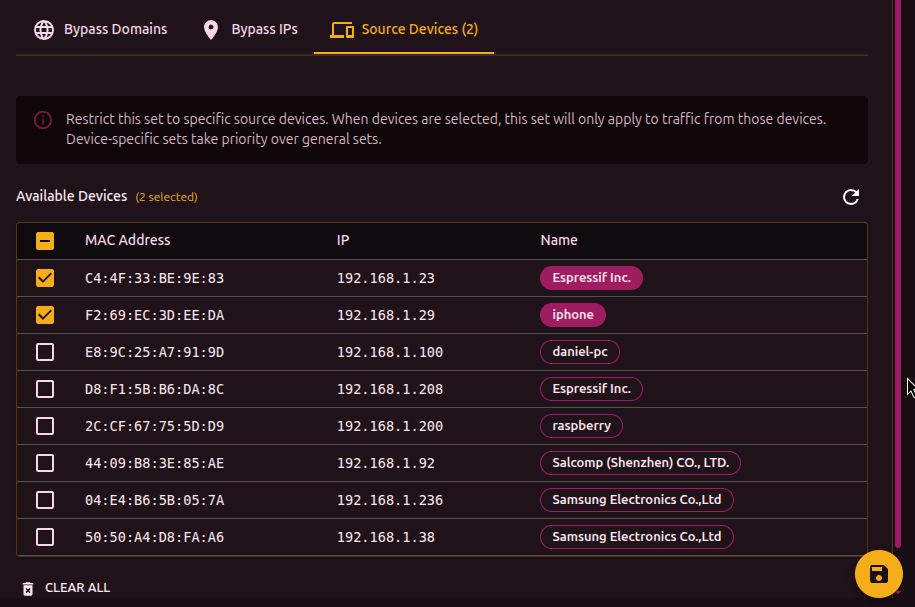
If no device is selected, the set applies to all traffic. When devices are selected, only their traffic is matched. Device-bound sets take priority over generic ones.
Every routing rule matches a destination address. Source devices decide whose traffic is offered to that rule, not which traffic is steered, so a set whose only target is a source device routes nothing and b4 installs no rule for it.
With the device selected and Match any IP address on in the Bypass IPs tab, the set routes everything from that device. Traffic the router itself originates is left alone for such a set, because it can never come from a source device.