Geo data
What GeoSite and GeoIP are
GeoSite and GeoIP are databases in the V2Ray format that group domains and IP ranges into named categories. A set can target a whole category instead of a list of single domains or addresses.
- GeoSite (
geosite.dat) - domains grouped into categories. Theyoutubecategory, for example, holds the domains of YouTube (youtube.com, googlevideo.com, ytimg.com and others). - GeoIP (
geoip.dat) - IP ranges grouped into categories, by country or, in b4geoip, by service.
Sources
b4 offers three preset sources. A database can also be downloaded from any other URL.
| Source | Contents | Link |
|---|---|---|
| Loyalsoldier | Global database of domains and IPs (China + worldwide) | GitHub |
| RUNET Freedom | Database tuned for Russian blocking | GitHub |
| b4geoip | Official b4 GeoIP database - IP ranges by ASN (GeoIP only) | GitHub |
RUNET Freedom for GeoSite and b4geoip for GeoIP are the recommended sources, and the installer offers both by default.
b4geoip
The official GeoIP database of the b4 project. It is built automatically from RIPE NCC data, the IP prefixes each ASN actually announces. It contains categories for:
- Cloud providers - AWS, Google Cloud, Azure, DigitalOcean, Hetzner, OVH, Scaleway, Oracle Cloud, Contabo, AEZA
- CDN - Cloudflare, Akamai, Fastly, CDN77
- Gaming companies - Roblox, Valve/Steam, Sony/PlayStation, Nintendo, EA, Riot Games, Ubisoft, Epic Games, Wargaming, Bungie, Take-Two, CCP
- Platforms - Telegram, GitHub, Apple, Adobe, Amazon, Blizzard
b4geoip groups addresses by service rather than by country, so a set can target the addresses of one platform.
Configuration
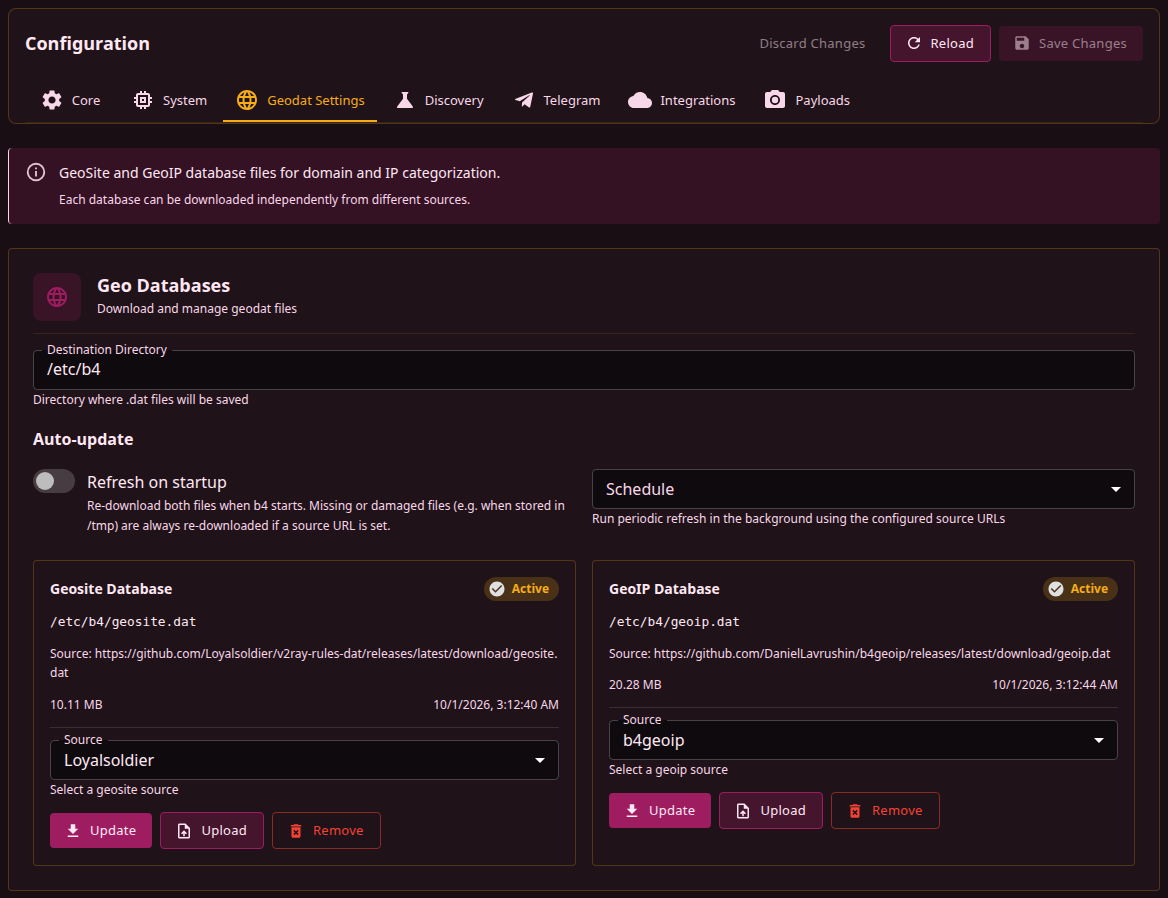
The Settings, Geodat Settings tab holds the Destination Directory field, the Auto-update group (see Auto-update) and one card per database, Geosite Database and GeoIP Database.
- Open Settings, Geodat Settings.
- In Destination Directory, enter the directory for the files.
- On the card of the database, pick a Source, or pick Custom URL... and enter the full URL of the
.datfile in Custom URL. - Press Update.
Destination Directory
Update and Upload write the files to Destination Directory, always as geosite.dat and geoip.dat. The field shows the directory of the configured GeoSite file, or of the GeoIP file when only that one has a path, and /etc/b4 when neither has. The directory has to be an absolute path without .., outside /proc, /sys, /dev, /boot and /run. b4 creates it when it does not exist.
The field is not a saved setting, so editing it does not enable Save Changes. A new directory takes effect on the next Update or Upload of each card, and a hint under the field names the current and the new directory while they differ. The file is written to the new directory, and the copy b4 wrote at the old path is deleted. A file under a name other than geosite.dat or geoip.dat stays where it is.
Background downloads always write to the directory of the GeoSite file, or of the GeoIP file when only that one has a path, and delete the copy in the other directory the same way.
Database cards
The chip in the card header shows the state of the database:
- Active - the file exists. Its size and modification time are shown under the path.
- Not Found - a path is configured, but there is no file at it.
- Disabled - no path is configured, and the database is off.
Under the header are the file path, or Not configured when there is none, and the source URL stored for the database. An uploaded file shows Local upload instead of a URL, and a database with neither a URL nor a file shows Not set. The configuration stores them as system.geo.sitedat_path and system.geo.sitedat_url for GeoSite, and as system.geo.ipdat_path and system.geo.ipdat_url for GeoIP.
The Source list holds Custom URL... and the presets that publish this database, so b4geoip appears on the GeoIP card only. It starts at the preset whose URL is stored, at Custom URL... with the URL filled in when the stored URL matches no preset, and at Loyalsoldier when the database has no path. Picking a source changes nothing by itself. The URL is stored when Update succeeds.
| Button | Action |
|---|---|
| Update | Downloads the selected source into the destination directory as geosite.dat or geoip.dat, stores the path and the source URL, and reloads the categories that sets use. Inactive until a source is picked or, with Custom URL..., a URL is entered |
| Upload | Writes a .dat or .db file of up to 500 MB from the browser into the destination directory under the same name, stores the path and clears the source URL. Neither auto-update option refreshes an uploaded file |
| Remove | Deletes the file and switches the database off, see Removing a database. Inactive when the database has neither a path nor a file |
The line under the buttons reports progress and the result. Upload and Remove cancel a download in progress. A download started while another one runs, from the other card or in the background, fails with another geodata download is already running.
Removing a database
Remove opens the Remove geo database dialog with the path of the file. The Remove button in the dialog deletes the file and clears the path and source URL of the database. The database stays off until the next Update or Upload, and neither Refresh on startup nor Schedule restores it.
A file is deleted only when its path is absolute, it is named geosite.dat (GeoSite) or geoip.dat (GeoIP), and it lies outside /proc, /sys, /dev, /boot and /run. Any other file, such as one under a custom name, stays on disk, the database is switched off all the same, and the line under the buttons says the file was kept. The check goes by file name only, so a geosite.dat or geoip.dat that another service also reads is deleted too.
A set that lists categories from a database, even a disabled one, requires that database's path, and a configuration where the path is empty fails validation. The dialog lists such sets. With one of them present, Remove deletes the file and then fails with Failed to save configuration: Configuration is invalid. The path and source URL stay, and the next check for missing files downloads the file again. Removing those categories from the sets first lets the database be switched off.
On a device with little storage, removing a database that no set uses frees its full size. A set that matches by domain only reads nothing from geoip.dat.
Using in sets
Once a database has a path and b4 has read its list of categories, the set editor shows a field for them on the Targets tab, Bypass GeoSite Categories on the Bypass Domains sub-tab and Bypass GeoIP Categories on the Bypass IPs sub-tab. The field is hidden while the database has no path.
Each selected category shows the number of domains or address ranges in it. Clicking a GeoSite category opens a preview with the total number of its domains and the first 100 of them. GeoIP categories have no preview. The Targets page describes how sets match by category.
Updating
Update replaces a database on demand, and b4 reloads the categories that sets use without a restart. Background downloads fetch the stored source URLs, either on the Auto-update options or to restore a missing file.
Auto-update
| Field | Configuration key | Default | Effect |
|---|---|---|---|
| Refresh on startup | system.geo.auto_update.on_startup | Off | About 45 seconds after b4 starts, downloads every database that has a source URL |
| Schedule | system.geo.auto_update.interval | Off | Daily, Weekly or Monthly (daily, weekly, monthly). Downloads every database that has a source URL once 24 hours, 7 days or 30 days have passed since the last run, or at the first check when no run is recorded. b4 checks this every 30 minutes |
| Last run | system.geo.auto_update.last_run | - | Shown under the group after a background download has refreshed every database that has a source URL. Update does not change it |
Both fields are saved with Save Changes (see Saving and restarting) and apply without a restart. The next 30-minute check reads the new Schedule, and Refresh on startup acts at the next start.
Whatever these fields say, a database whose path and source URL are set and whose file is missing or damaged is downloaded again, about 45 seconds after start and then at each 30-minute check. A failed download at start is retried every minute for up to five minutes, unless the source returned a file that failed the checks. After a failed background download, b4 waits two hours before the next one, and twice as long after each further failure, up to a day. A successful download resets the wait.
b4 starts the background downloads only together with the web server. With its port set to 0 (see Web Server), none of them runs, the recovery of missing files included.
Checks before a file is replaced
A download or an upload goes to a temporary file in the destination directory and replaces the current file only after a check. The file has to parse as a GeoSite or GeoIP database from start to end, and at least one of its first 64 records has to hold a domain (GeoSite) or a valid address range (GeoIP). An error or block page, an empty response, a transfer cut short and a GeoIP file uploaded as GeoSite are all rejected, and the current file stays in place. A download that receives no data for 60 seconds, or takes longer than an hour, is abandoned. Temporary files left by an interrupted download are deleted at the next start once they are an hour old.
When a direct download of a preset source fails, b4 repeats it through the update mirrors. A custom URL gets the same fallback only when it is on GitHub under one of the accounts the mirrors serve (DanielLavrushin, Loyalsoldier, runetfreedom, XTLS, Flowseal).
GeoSite and GeoIP files range from about 10 MB to more than 70 MB (the RUNET Freedom GeoSite). A new copy is written next to the current one before it replaces it, so an update needs room for both at once. When there is not enough, the update fails and the current file is kept.
Installer
The installer lists every source with the size of its file. When no source is configured yet, it offers the recommended one (RUNET Freedom for GeoSite, b4geoip for GeoIP) if that file fits in the target directory next to the current one, and otherwise the smallest source that fits; a reinstall keeps the source already configured. It downloads the files next to the current ones while b4 is still running, checks each against the .sha256sum file that the source publishes next to it, when there is one, and moves them into place only after b4 is stopped. A failed or rejected download leaves the current file, and a file whose checksum already matches the published one is not downloaded again. B4_GEO_MAX_TIME sets the time limit of one download attempt in seconds (3600 by default, 0 for none).
Damaged files
A file can still end up damaged, for example cut short by an earlier version of the installer or by a full disk. b4 then starts with the categories it can read and logs each category that it could not read together with the sets that run without it. Such a set matches only its other targets (domains, addresses, ASNs); a set whose only targets are those categories matches nothing, and its port filter does not turn it into a port-only set. With a source URL set and the web server on, b4 downloads the damaged file again about 45 seconds after start and retries as described under Auto-update.
Tools
| Project | Description |
|---|---|
| GeodatExplorer | Web application that shows the categories, domains and IP ranges in a .dat file, for checking what a category holds before it goes into a set |
| v2dat | Command-line utility that unpacks V2Ray .dat files into text lists, for scripts and automation |
| b4geoip | Official b4 GeoIP database (described above) |