DC Relay
A DC Relay is for the case where b4 runs inside the censored network and the WebSocket transport is blocked as well, so the direct route to Telegram has to leave through a VPS.
Phone ──────▶ b4 (router) ──────▶ VPS ──────▶ Telegram
       TSPU sees                 TSPU sees
   "HTTPS to google.com"      "traffic to VPS"
The VPS needs nothing but a TCP forwarder. No keys, no MTProto-specific software.
The relay belongs to the proxy server. The WebSocket bridge clears it for every session it carries, and the WebSocket only transport mode never emits a TCP leg at all, so the field has no effect in either case.
Setting it up
Install socat on the VPS:
apt install -y socat
Set DC Relay in Settings, Telegram to the VPS address with the base port, for example my-vps.com:7007. The field appears when the transport mode is Direct TCP or Auto.
Then open the ? button beside the field. The DC Relay socat setup dialog lists the data centres and a ready-to-run socat command for each, with Copy all at the bottom.
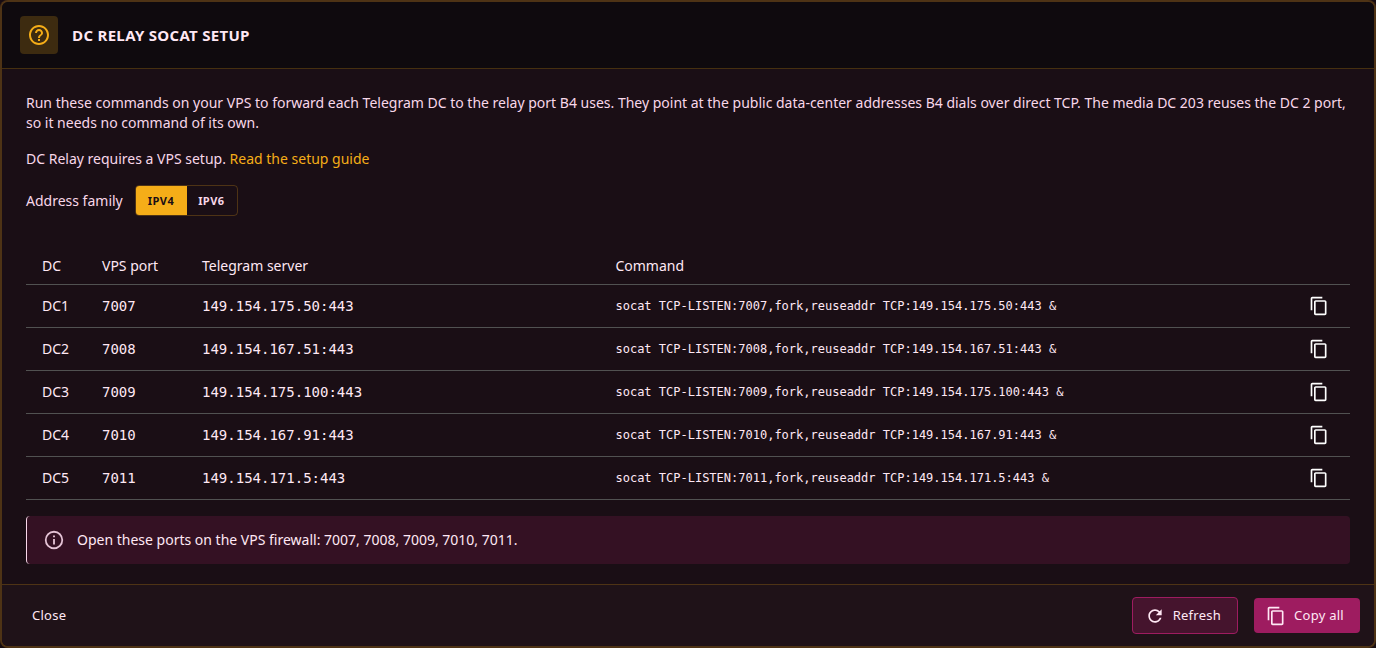
Each socat forwards one relay port to the public data-centre address b4 dials directly: base port + DC - 1 to that data centre's :443 endpoint. The media data centre 203 reuses DC 2's relay port, so it needs no command of its own.
Every port the dialog lists has to be open on the VPS, five in total, one per main data centre. The dialog prints them on its last line.
Running the commands from /etc/rc.local or a systemd unit keeps them up across a reboot.
With Auto and a relay configured, the plan puts relay TCP first and WebSocket behind it. The proxy server's warm WebSocket pool is consulted before that plan is built, so a warm pooled connection can still be used ahead of the relay.
IPv4 or IPv6
The dialog's Address family switch changes which Telegram addresses the generated commands connect to. It is for a VPS that reaches Telegram over IPv6 but not over IPv4.
The switch changes the upstream side of the command only:
# IPv4
socat TCP-LISTEN:7007,fork,reuseaddr TCP:149.154.175.50:443 &

# IPv6
socat TCP-LISTEN:7007,fork,reuseaddr TCP6:[2001:b28:f23d:f001::a]:443 &
The listen side follows the DC Relay address instead. An IPv6 literal there is written in brackets, [2001:db8::1]:7007, and the helper emits TCP6-LISTEN so the VPS also accepts b4's connection over IPv6. The two sides are independent, and an IPv4 relay address with IPv6 upstreams is a valid combination.
The data-centre addresses b4 dials are built in, over IPv4 and IPv6 alike. Refresh updates the list b4 uses to attribute an observed address to a data centre and the addresses this dialog prints; it does not change what gets dialled.
Media DC 203 has no IPv6 address and shares DC 2's relay port, so media follows whatever the DC 2 command points at. If media stops loading after a switch to IPv6, that one command goes back to IPv4 and the rest stay.