Telegram Desktop WEB proxy
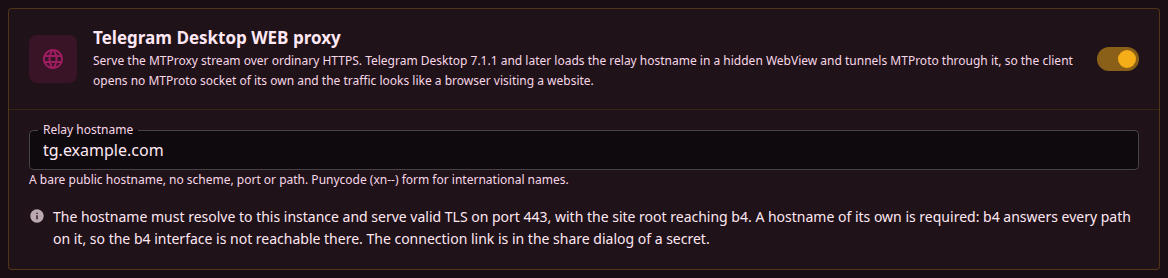
b4 serves the MTProto stream over ordinary HTTPS on a hostname of its own. Telegram Desktop 7.1.1 and later loads that hostname in a hidden WebView, which opens a single WebSocket back to b4 and multiplexes every Telegram connection over it. The client opens no MTProto socket, and what a network sees is a browser loading a website.
Each multiplexed stream is handed to the same code path as a plain MTProto connection: the same secrets, the same handshake, the same upstream routing to a data centre. Nothing is installed on the client.
Because the hostname needs a publicly trusted certificate on port 443, this is a mode for b4 on a VPS rather than on a router behind CGNAT.
What has to be true first
Four conditions. Only the first is enforced by the interface, which hides the WEB proxy card while the proxy server is off.
- The MTProto proxy is enabled and its listener binds. Secrets are loaded only when that listener starts. If its port is already in use, start-up fails, no secrets load, and the relay answers every request with the placeholder page.
- The relay has a listener. With Relay port empty the relay is a virtual host on b4's own web server, so a web server port of
0means the relay does not exist. With a relay port of its own it is a listener of the MTProto proxy and the web server plays no part. Telegram fixes the scheme and the port, so the hostname has to answerhttps://<host>/on 443, either from b4 directly or through a forward or reverse proxy. See Relay port. - The hostname is not shared with the interface. Once the
Hostheader matches, b4 claims every path on that name. The interface, the API and the login endpoints all return the placeholder page there. - TLS is publicly trusted. A self-signed certificate is enough for the b4 interface and is not enough here.
The relay virtual host matches only while both switches are on. With a hostname set, the WEB carrier on and the proxy server off, requests to that name fall through to b4's own web server, so a public DNS name answers with the b4 interface and its login page rather than with the placeholder site. The WEB proxy card is hidden while the proxy server is off, so this state is reachable only by editing the configuration file.
When the web server's certificate and key do not load, b4 logs a warning and falls back to plain HTTP. The web server comes up, the relay comes up with it, and nothing answers on 443. A relay port of its own behaves differently: a pair that fails to load, its own or the inherited one, is an error in the log and that listener is not started at all, while no pair at all starts it as plain HTTP.
Setting it up
- Point a hostname at the b4 host. A bare public DNS name. The field rejects a scheme, a port, a path, credentials, an IP address and a single-label name; an international name has to be entered in its punycode (
xn--) form. - Serve it over trusted TLS on 443. Either b4 itself with a valid certificate and key, on the web server port or on a relay port of its own, or a reverse proxy that terminates TLS, preserves the
Hostheader or setsX-Forwarded-Host, and allows the WebSocket upgrade on/api/v1/ws. - Enable the MTProto proxy and add at least one secret. Links are generated per secret.
- Enable the WEB carrier and enter the relay hostname, under Settings, Telegram, Telegram Desktop WEB proxy. The switch and the hostname take effect on the next request; a change to the relay port or its certificate restarts only that listener, the MTProto proxy and its connections stay up.
- Copy the link from the secret's Share connection link dialog, the row labelled WEB · Telegram Desktop 7.1.1+, and add it in Telegram Desktop.
The link has the form https://t.me/webproxy?server=<hostname>&secret=dd<32 hex characters>.
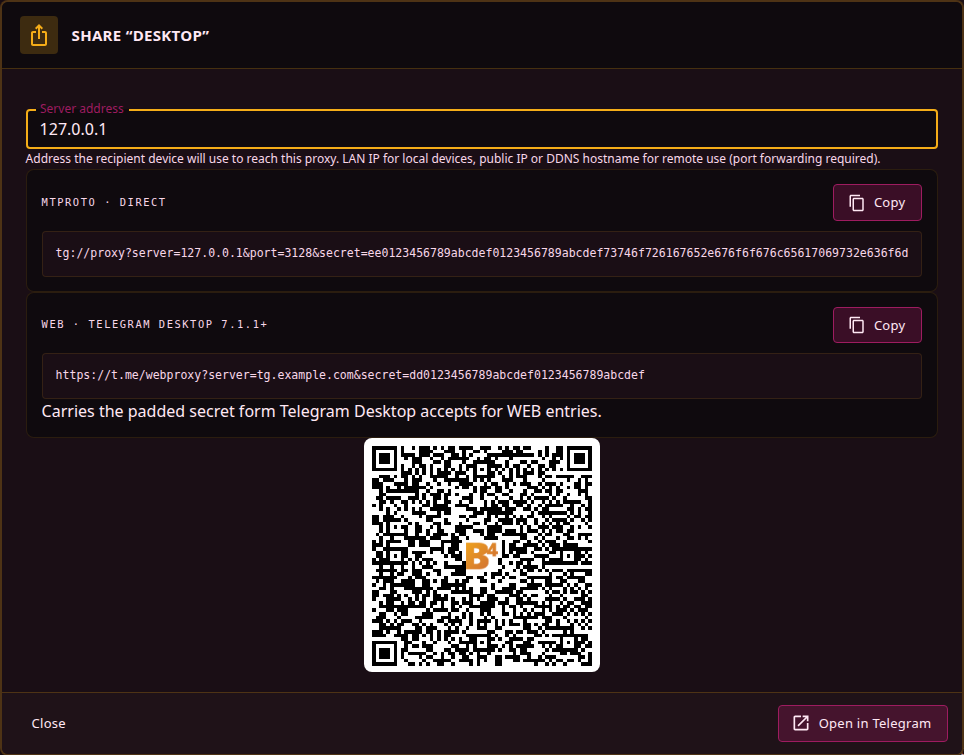
Telegram Desktop refuses fake-TLS (ee) secrets for WEB entries, so the link carries the padded (dd) form of the same key, without the domain the ee secret ends in. A link assembled by hand from the visible secret does not work; the dialog is the only correct source.
The token in the link is derived from the secret and the hostname together, and it is recomputed against the current hostname on every request. Changing the relay hostname silently breaks every link already handed out, and each one has to be reissued.
Relay port
The web server decides by the Host header alone. On the relay hostname it answers as the relay; on any other name, and on a bare IP address, it answers as the b4 interface with its login page. Whatever carries public 443 to that port carries both: a router forward from WAN 443 to the web server port, or the web server itself moved to 443, puts the login page on https://<public IP>/ next to the placeholder on https://<hostname>/. The interface stays behind its credentials, but its presence is visible to anyone scanning the address.
Relay port separates the two. Switching the WEB carrier on for a fresh setup fills it with 443, since that is where Telegram connects; an empty field is the shared layout above, which every configuration from before this field has. With a port set, the MTProto proxy opens a listener of its own on that port, on the proxy's bind address, and the web server stops answering the relay hostname for as long as that listener is up. A port that fails to bind or a certificate that fails to load is an error in the log, and the web server keeps serving the relay hostname in the meantime, so the relay does not fall through to the interface:
- A request for the relay hostname is handled exactly as before: the bridge page for a valid token, the carrier WebSocket on
/api/v1/ws, the placeholder for everything else. - A request for any other name or for an IP address gets the placeholder page,
200on/and404on every other path. The interface, its API and its login page do not exist on this port.
TLS on the relay port is the web server's certificate and key by default, the same pair the shared layout used, and that pair then has to be the trusted one for the relay hostname. Putting a public certificate into Settings, System, Web Server has a side effect on the interface: it becomes HTTPS-only, and every visit by IP on the LAN shows a browser warning because the name does not match. Certificate for the relay hostname under the card takes a pair that goes to the relay port only, so the interface can stay plain HTTP or keep a certificate of its own. No pair anywhere means plain HTTP on the relay port with a warning in the log, which is the layout for a TLS-terminating proxy in front of b4. A port equal to the web server's or the MTProto proxy's is rejected on save, and a port already taken on the host is reported by the port check before the configuration is written.
A relay port of its own also gets an Expose to internet switch, shown under Relay port while the field holds a port, and while the switch is on with the field empty, so that it can be turned off. It adds the same firewall rule as the MTProto proxy's switch, one that accepts connections to the relay port from any address, as described under Access from the internet. With the field empty the relay has no port of its own to open: it is reached through the web server's port, and only the web server's switch opens that, together with the interface, its API and its login page.
The WAN side reaches the relay port, never the interface port: Expose to internet is on for the relay port, and when the relay port is not 443 itself, a forward from WAN 443 leads to it. The interface port is neither exposed nor forwarded. https://<hostname>/ reaches the relay, https://<public IP>/ reaches the placeholder, and the interface is reachable only from the LAN.
The t.me/webproxy link carries no port and Telegram always opens https://<hostname>/. The relay port is where 443 has to arrive, not something the client is told about, so 443 itself, a forward from 443, or a proxy on 443 are the only layouts that work.
Placeholder page
Every visitor who is not a Telegram client sees the placeholder: a plain "Service status" page. It is the same page on every b4 installation, so the hostname is recognisable as a b4 relay to anyone who has seen one before.
Placeholder page in the card replaces it. The upload is one HTML file of at most 1 MiB, stored as webproxy_page.html next to the configuration file; the same file can be put there by hand. It is served as is, on the next request, with the status codes above, and removed with the Remove button or by deleting the file, which restores the built-in page. The download returns the installed file for editing.
The page has to be self-contained. The relay answers every path on the relay hostname, and on a relay port every path on every name, with this same file, so a stylesheet, script or image referenced by a relative path comes back as the page itself. Styles go inline, images go in as data: URIs, and anything external has to be an absolute URL on another host. The bridge page that Telegram loads is separate and is not affected.
The response headers are fixed: Cache-Control: no-store, Referrer-Policy: no-referrer, X-Content-Type-Options: nosniff and a Content-Security-Policy that limits framing. The carrier path /api/v1/ws and the ?bridge= query on / keep their meaning whatever the page contains.
Confirming it works
Opening the hostname in a browser proves nothing. A wrong hostname, a missing or wrong token, an expired ticket, a plain GET where a WebSocket upgrade was expected and an exhausted carrier limit all produce the same placeholder page, and none of them is logged.
What confirms the relay is carrying traffic is the log:
web carrier up from <ip> (secret=<label>)
web proxy new stream <n> from ...
followed by the ordinary relay line for the data centre the stream reached. Connections carried this way also appear on the Traffic page, labelled as MTProto with the secret's name.
Boundaries
- Telegram Desktop only, 7.1.1 and later. The mobile clients have no WEB proxy entry type.
- The relay is served ahead of b4's web authentication. The token is the only gate: there is no source allowlist and no rate limit, so the hostname plus a secret is enough for anyone holding both.
- Every Telegram connection from one client rides a single carrier. When the carrier drops, on a 90 second idle timeout, a protocol violation, or the client closing, all of its streams end at once.
Max connectionsand the TCP timeouts do not apply here. The WEB path is bounded separately at 256 concurrent carriers and 512 streams per carrier, and nothing is reported when either limit is reached.