MTProto proxy
A Telegram proxy that clients connect to with a secret. b4 terminates a fake-TLS handshake, so what crosses the network looks like an HTTPS connection to the domain configured as the Fake SNI, and relays the MTProto stream to a Telegram data centre over whatever upstream transport is configured.
This is the only mode that works from outside the LAN, and the only one every Telegram client supports.
Enabling the proxy
Settings, Telegram, MTProto Proxy. The card's fields stay hidden until its switch is on.
| Field | What it does |
|---|---|
| Bind address | The address the listener binds to. 0.0.0.0 accepts from every interface, 127.0.0.1 from the host only. |
| Port | The listen port. The default is 3128. |
| Expose to internet | Adds a firewall rule that lets connections from any address reach the port, over IPv4 and IPv6. Off by default. |
| Fake SNI domain | The domain the fake-TLS handshake presents, and the site an unrecognised connection is forwarded to. |
Port 443 is a common choice because the traffic is already shaped like TLS and that port normally carries it.
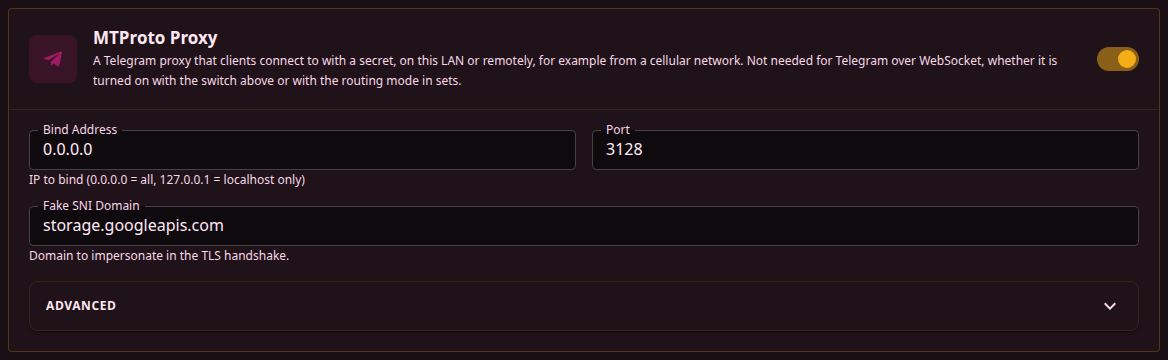
A host whose firewall drops incoming connections, as the WAN side of a router does, lets nothing through to the proxy until Expose to internet is on, and the symptom is a client that sits at "Connecting" forever. The switch opens the port on the b4 host only: a router or modem in front of it still needs a port forward, and a WAN address behind carrier-grade NAT cannot be reached from outside over IPv4 at all. See Access from the internet.
Settings take effect on save. b4 restarts the proxy itself when the port, bind address, Fake SNI or an upstream setting changes, which drops the sessions it is carrying; Telegram reconnects on its own. The service does not need restarting.
Secrets
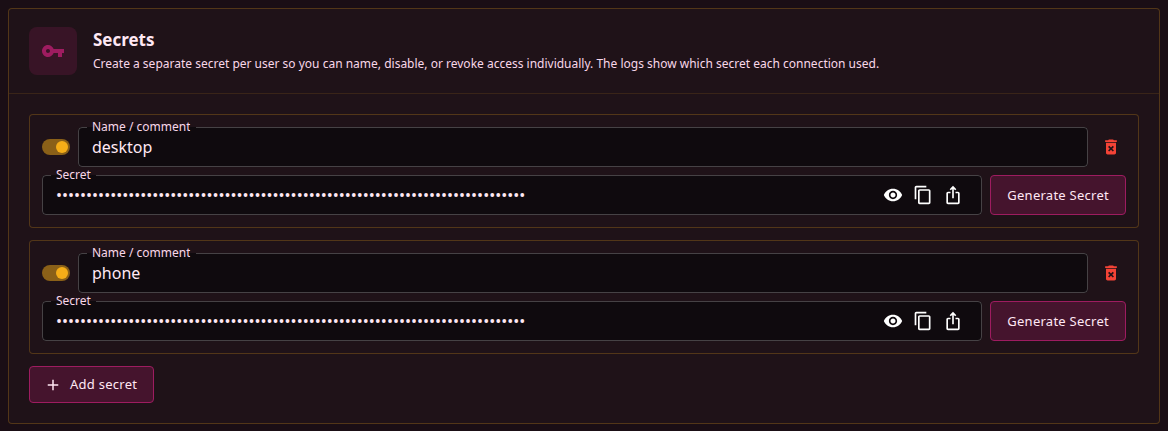
Secrets are a list, not a single value. Each entry has a name, its own switch and its own share link, and the connection log records which secret a client used, so access can be given and withdrawn one person at a time.
Generate secret creates one from the current Fake SNI domain. The result is a fake-TLS secret: hexadecimal, starting with ee, carrying a 16-byte key and the domain name.
b4 accepts nothing else. A padded (dd) secret, a bare 32-character key or a base64 secret from another proxy is rejected when the configuration is saved, and the save fails until the field is corrected. The domain inside the secret is a label: b4 never checks it against the server name a client actually sends.
A configuration with secrets present but all of them disabled starts normally, logs secrets: 0, and closes every client connection immediately after accepting it.
Adding the proxy in Telegram
Share connection link opens a dialog with the server address, a tg://proxy link, a QR code, and, when the WEB proxy is configured, a second link for Telegram Desktop. The link and the QR code carry the address in the field, which can be edited.
A Local network / Internet switch at the top of the dialog decides where that address comes from:
- Local network fills in the address the browser used to open the interface, or the bind address when the proxy listens on one specific address. It is the address for devices in the same network.
- Internet fills in the WAN IPv4 address when it is public. Otherwise b4 looks up the public IPv4 address its own connections leave from, through the IP lookup services the DPI detector uses (
api4.ipify.organd others), keeps the answer for five minutes and fills that in, or a public IPv6 address of the WAN when the lookup finds nothing. With the WAN IPv4 address in100.64.0.0/10, carrier-grade NAT, a public IPv6 address of the WAN is filled in first, and the looked-up IPv4 address is offered next to it. Every address found, the WAN addresses included, is listed to pick from, and a DDNS name can be typed instead. A proxy bound to one specific address is offered at that address only, and no public address is looked up, except when that address is the WAN IPv4 address and it is not public: then the public IPv4 address is looked up and filled in, with the bind address offered next to it. The WAN is the interface that holds the default route, or the TUN engine's uplink while TUN runs.
The port and the bind address in the tg://proxy link come from the saved settings the proxy is running with. While the port, the bind address or Expose to internet has unsaved changes, the dialog notes that they apply after saving and that the link uses the port the proxy is running on. When the proxy is switched on only in the unsaved settings, or the secret being shared is not saved yet, the running proxy does not accept the link, and the dialog says so instead.
In Internet mode the dialog warns when the link is not expected to work from outside:
- the port is not open, because Expose to internet is off or not saved yet;
- the proxy is not listening on its port, for example because another program holds it, so b4 does not open it;
- the firewall rule could not be added, and the dialog shows the error;
- Skip IPTables/NFTables Setup is on, so b4 adds no rule at all;
- the proxy is bound to a loopback address, or to an address that is not the WAN address;
- there is no default route, so there is no WAN address to offer;
- the WAN address is in
100.64.0.0/10, carrier-grade NAT, which connections from the internet do not reach over IPv4; - the WAN address is private, so the port also has to be forwarded on the router in front or allowed in the cloud provider's firewall;
- the WAN address is in another range that is not public;
- the address is IPv6, which only clients with IPv6 connectivity reach;
- the host's addresses or the public IPv4 address could not be read.
A connection from the same network proves nothing either way. When b4 runs on the router, a LAN device reaches it from the LAN side, which the router's firewall accepts; when b4 runs behind another router, a connection from inside to the public address needs that router to loop it back, which many routers do not. A phone on mobile data connects from outside. An IPv6 address goes into the tg://proxy link without brackets.
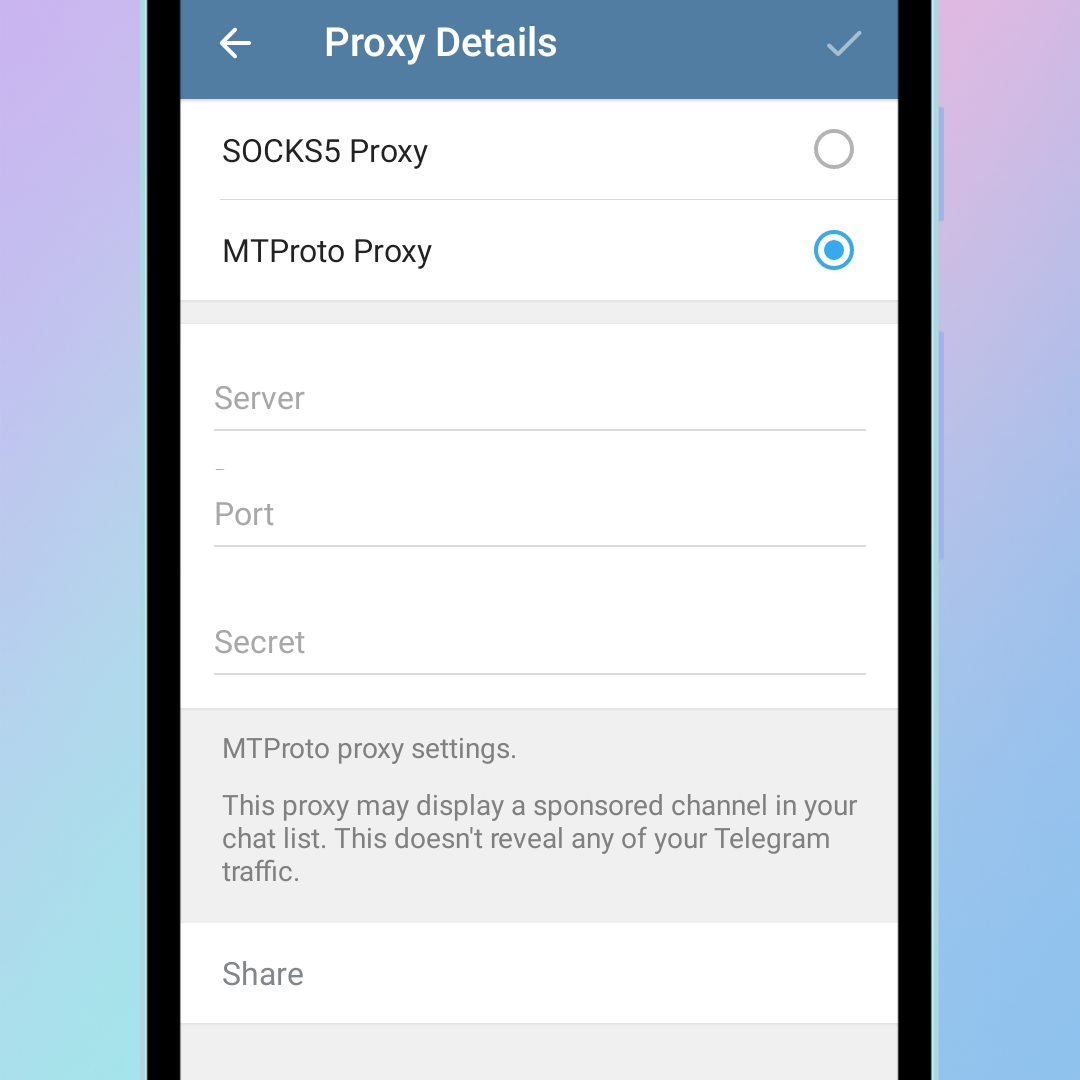
Entered by hand, in Settings -> Data and Storage -> Proxy -> Add proxy -> MTProto:
- Server - the b4 address. A LAN address for local devices; a public address or DDNS name for anything else, reachable only with the port open to the internet, see Access from the internet.
- Port - the listen port from above.
- Secret - the value copied from the secrets list.
What an unrecognised connection sees
A connection whose fake-TLS handshake fails verification is spliced through to the Fake SNI domain on port 443, so it is answered by the real site rather than by b4. This only covers connections that got as far as a well-formed TLS handshake record: bytes that are not a TLS handshake at all are dropped, and the splice is skipped entirely when the Fake SNI field is empty.
The domain should be one that is reachable from the network in question and carries enough real traffic that its address is unremarkable.
Where the proxy runs
- On a VPS outside the blocked network - the upstream transport can be Direct TCP, and no relay is needed.
- On a router inside it - the WebSocket transport reaches Telegram without a VPS. If WebSocket is blocked too, the direct route has to go through a DC Relay.
The MTProto proxy is not required for Telegram over WebSocket, which is built at start-up regardless. It is required for the WEB proxy, which reuses its listener and its secrets.