Telegram upstream
Settings, Telegram, Telegram upstream (shared). These settings decide how b4 itself reaches Telegram's data centres. They are used by the proxy server and by the WebSocket bridge, so they apply even when the proxy server is off.
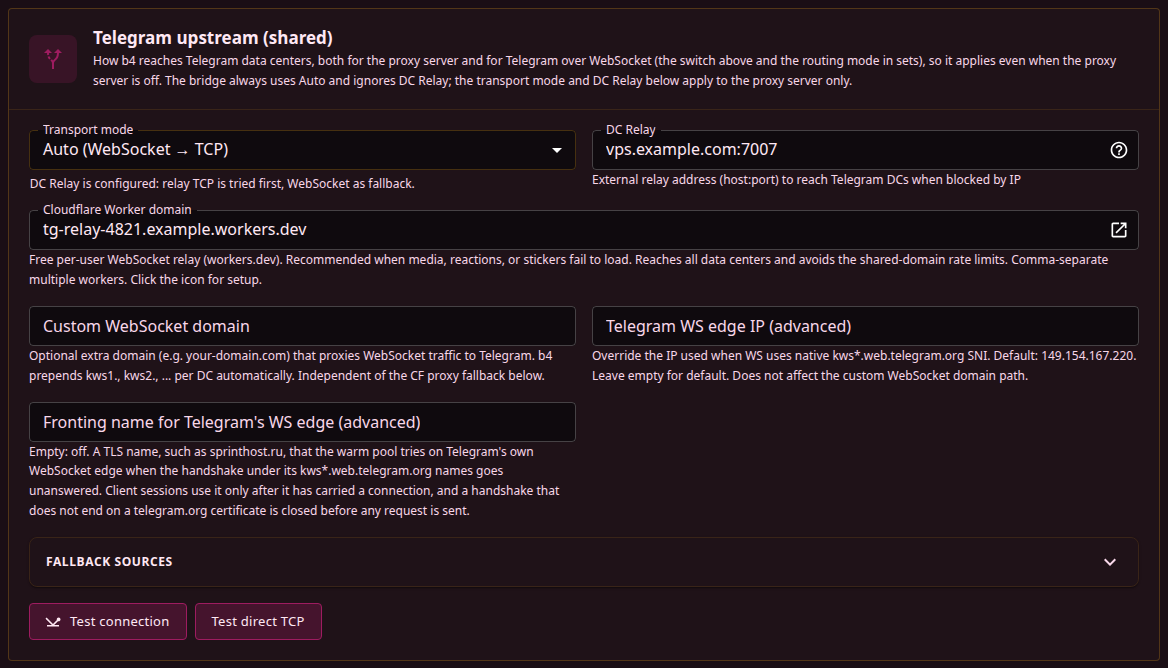
Transport mode
| Mode | What it does |
|---|---|
| Direct TCP | Dials the data centre address directly, or the DC Relay when one is set. |
| Auto (WebSocket -> TCP) | Tries the WebSocket routes first and falls back to direct TCP. |
| WebSocket only | WebSocket routes with no TCP leg at all. A DC Relay is ignored in this mode. |
The dropdown applies to the proxy server. The WebSocket bridge forces Auto for every session it carries.
Direct TCP needs a host that can reach the data centre addresses. 149.154.0.0/16 covers most of them but not all: DC 203 sits at 91.105.192.100, and DCs 4 and 5 are reached in 91.108.4.0/24 and 91.108.56.0/24.
Which routes exist, and in what order
For a given data centre, b4 assembles a candidate list and walks it:
- Direct TCP first, when the mode is Direct TCP, or the mode is Auto and a DC Relay is set.
- Telegram's own WebSocket edge,
kws<dc>.web.telegram.org. Only data centres 2 and 4 are served this way. A media session tries thekws<dc>-1name first, a primary session never does. - The custom WebSocket domain, as
kws<dc>.<domain>. - The shared CF proxy pool, as
kws<dc>.<pooled domain>, while CF proxy fallback is on. - The Cloudflare Worker domains, in random order.
- Direct TCP, when the mode is Auto and it was not placed first.
Workers that recently went silent mid-session are appended behind everything else rather than dropped, and if the list ends up empty in a mode that allows TCP, the direct route is added back ignoring its cooldowns.
Candidates overlap instead of queueing. The next one starts when the previous has not answered within half a second, or at once when it fails, with at most three in flight. The names of Telegram's own edge share one address, so they are dialled one at a time, and a sibling name is dropped once the address itself stopped answering. The list is also split into tiers in the order above: direct TCP starts only after every WebSocket route ahead of it has failed, and relay TCP placed first has to fail before any WebSocket route starts. A Worker joins the race once the WebSocket routes ahead of it have had a second and a half, unless it is ranked down after a stall. The first candidate to connect carries the session, and a slower one that connects afterwards is kept as a warm spare.
No new attempt starts after about four and a half seconds, and each attempt gets at most three. Telegram Desktop abandons a session that has not reached a data centre within about three seconds.
An address that did not answer the TCP handshake is stepped over by later sessions for a minute, a name whose TLS handshake was swallowed for five minutes, and both periods double while the failures repeat, up to thirty minutes. A single answer clears them.
The proxy server keeps a small pool of warm WebSocket connections and consults it before building the list above. With Auto and a DC Relay configured, a warm pooled connection can therefore win over the relay that the plan puts first. The bridge draws on the same pool while the proxy server runs in Auto or WebSocket only mode, and keeps one of its own otherwise.
A spare is retired after 75 seconds, since Telegram and the Cloudflare routes close an unused connection at about 90. Every five seconds the pool drops aged spares and tops up the data centres used within the last ten minutes, or three for those that ride the shared Cloudflare domains. While Telegram's own edge does not answer, data centres 2 and 4 are pooled on the Cloudflare routes and the edge is probed from the pool, at most every thirty seconds, instead of on a client's session.
Only data centres 2 and 4 have a native edge. For 1, 3, 5 and 203, "WebSocket" means the custom domain, the shared pool or a Worker, which is why media in foreign channels is the first thing to fail when none of those is configured.
Cloudflare Worker domain
A free per-user WebSocket relay hosted on the reader's own Cloudflare account, tried last of the WebSocket routes. Setup, the script and the reasoning behind its position in the list are on Cloudflare Worker relay.
CF proxy fallback
A rotating pool of Cloudflare-proxied domains, refreshed hourly from the URL in Fallback sources. It covers the data centres Telegram's own edge does not serve. The default source is tg-ws-proxy's list on GitHub; a self-hosted list can replace it.
Custom WebSocket domain
One domain that proxies WebSocket traffic to Telegram, for a self-hosted relay instead of the shared pool. b4 prepends kws1., kws2. and so on per data centre, so a single entry covers all of them and the name has to resolve for every data centre in use. It is tried after Telegram's own edge and ahead of the shared pool, and works with or without CF proxy fallback.
Telegram WS edge IP
Every dial that carries a native kws*.web.telegram.org name goes to one address, 149.154.167.220; the data centre is selected by the name in the HTTP Host header, not by the address. This field replaces that address for a network where the default one goes unanswered. It takes a host or an IP without a port, and an empty value keeps the default. The custom WebSocket domain resolves its own name and is unaffected.
Fronting name for the WS edge
Telegram's edge answers any TLS server name with its own certificate and routes the WebSocket by the Host header alone. Where a DPI drops the handshake for the kws*.web.telegram.org names while the address itself stays reachable, b4 presents this name in the TLS handshake instead and keeps the real name in Host, so a session still reaches the data centre and the cluster it asked for.
Fronting is off while the field is empty. sprinthost.ru is the name tg-ws-proxy uses. The name is tried by the warm pool only, at most every thirty seconds, after a handshake under Telegram's own names had time to finish and went unanswered or was reset. The handshake under the name has to end on a telegram.org certificate; anything else is closed before a request is sent, and the name is not tried on that address again for thirty minutes. Once the name has carried a connection, client sessions to the edge use it too, until a handshake under it fails and the edge answers its own names again. An address that does not accept the TCP connection at all is not retried under this name.
A network that blocks the edge's address outright, and one whose DPI answers for the address itself and forwards the connection by the name it sees, both defeat fronting. On the second kind the handshake under this name reaches the real host behind it, whose certificate is not Telegram's, and data centres 2 and 4 stay on the Cloudflare routes.
Fallback sources
Telegram's data-centre list is fetched from Telegram's own endpoint at start-up. DC list fallback mirror decides what happens when that endpoint is unreachable, and it is on by default.
The default mirror is hosted by the b4 author and receives the requesting IP address, and nothing else. Turning the switch off removes the fallback; the DC list mirror URL field replaces it with another one.
Refreshing the list changes how b4 attributes an address to a data centre and what the DC Relay helper prints. It does not change the addresses b4 dials, which are built in.
Testing
- Test connection probes data centre 2 over the configured transports, keeping any DC Relay, and reports the latency.
- Test direct TCP probes data centre 2 over direct TCP with the relay overridden, which separates a relay problem from a Telegram one.
Enabling or disabling the proxy, and changing the port, bind address, Fake SNI, transport mode, custom WebSocket domain, WS edge IP, fronting name or CF proxy fallback, restarts the MTProto proxy and drops the sessions it is carrying. Telegram reconnects on its own. The service itself is not restarted.