The Splitting sub-tab decides how b4 splits the first data packet of a connection, the TLS ClientHello, so that DPI cannot read the server name in it. Discovery tests the methods against a blocked site, and the method it suggests is the first one to try. Manual changes are for tuning.
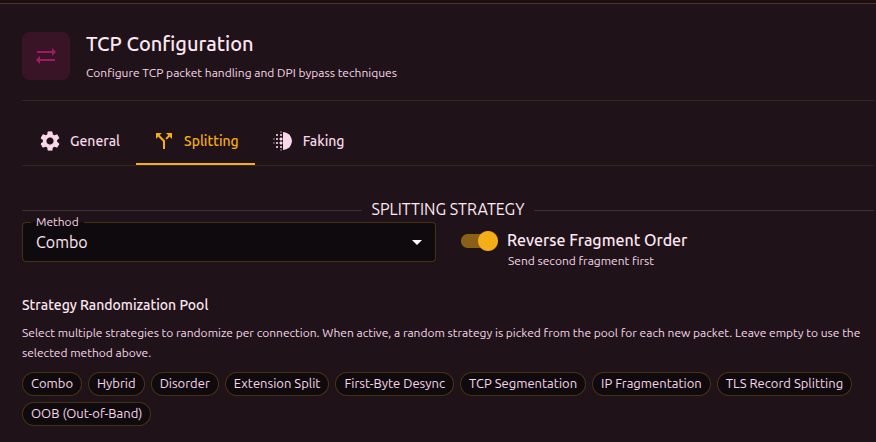
Splitting Strategy
| Field | What it does | Default |
|---|
| Method | The splitting method, see the table below. The settings of the chosen method appear under it. | Combo |
| Reverse Fragment Order | Sends the second fragment first. | On |
| Strategy Randomization Pool | Methods that b4 picks from at random for each new connection, so that connections differ. An empty pool uses Method. | Empty |
| Method | What it does |
|---|
| Combo | Splits at several points, shuffles the segments and adds timing jitter. It can add a decoy and fake packets between the segments. |
| Hybrid | Picks Combo, Disorder, Extension Split or First-Byte Desync for each ClientHello, by the split points it finds in it. It has no settings of its own. |
| Disorder | Sends the real segments out of order with timing jitter, without fake packets unless Fake Per Segment is on. |
| Extension Split | Splits the ClientHello just before the SNI extension. It has no settings of its own and uses Reverse Fragment Order and Segment 2 Delay. |
| First-Byte Desync | Sends one byte, waits, then sends the rest, so that DPI gives up before the server name arrives. The wait is Segment 2 Delay on the General sub-tab, at least 100 ms. |
| TCP Segmentation | Splits the packet into TCP segments. |
| IP Fragmentation | Splits the IP packet into IP fragments. |
| TLS Record Splitting | Splits the ClientHello into several TLS records inside one TCP packet. |
| OOB (Out-of-Band) | Sends a one-byte fake with the TCP URG flag. DPI that follows the connection reads it as data. The fake goes out at Fake TTL and has to expire before the server, which would drop the real byte at that position. |
| Disabled | No splitting. Only fake packets are used, if they are on. |
TCP Segmentation and IP Fragmentation
| Field | What it does | Default |
|---|
| Smart SNI Split | Splits in the middle of the server name. The recommended choice. | On |
| Fixed Split Position | Splits at this many bytes from the start of the TLS payload, 0 to 50, where 0 turns it off. A range makes each connection pick a random position. With Smart SNI Split also on, the packet becomes three segments. | 1 |
Combo

| Field | What it does | Default |
|---|
| First Byte | Splits after the first byte. | On |
| Extension Split | Splits before the SNI extension. | On |
| SNI Split | Splits in the middle of the server name. | On |
| Enable Decoy | Sends a fake ClientHello with an allowed server name before the real one. The fake has a low TTL, so DPI sees it and the server does not. | Off |
| Shuffle Mode | Middle Only keeps the first and last segments in place, Full Shuffle reorders all of them, Reverse Order sends the last one first. | Full Shuffle |
| First Segment Delay | Pause after the first segment, 10 to 500 ms. | 30 |
| Jitter Max | The largest random delay between the other segments, 100 to 10,000 µs. | 1000 |
| Fake Per Segment | Sends fake overlapping packets before every segment, not only the first. Fakes Per Segment sets how many, 1 to 11. | Off |
With every split point off, Combo sends the packet in one piece, and the tab shows a warning.

Disorder
| Field | What it does | Default |
|---|
| SNI-Based Splitting | Splits around the server name. | On |
| Shuffle Mode | Full Shuffle, Reverse Order, or In Order, which sends the segments as they lie in the packet. | Full Shuffle |
| Split Position | Shown while SNI-Based Splitting is off. Cuts the packet once at this many bytes from its start, into two segments. 0 keeps Disorder's own cuts: after the first byte, in the middle and at three quarters. | 0 |
| Min Jitter, Max Jitter | The random delay between segments, in µs. Used while Segment 2 Delay is 0. Max Jitter has to be greater than Min Jitter. | 1000, 3000 |
| Fake Per Segment | As in Combo. | Off |
Sequence Overlap (seqovl)
Shown for Combo and Disorder. b4 puts fake bytes in front of a real segment and moves its sequence number back by the same amount. DPI reads the fake bytes as the start of the data, and the server discards them. Combo adds them only to the first data packet of a connection, when that packet starts a ClientHello or an HTTP request. Later requests on the same connection go without them.
Disorder adds them to the second segment of every packet it splits, and only when that segment starts further into the packet than Overlap Length. With SNI-Based Splitting on, the second segment starts at the server name. With it off, it starts at Split Position, so the position has to be greater than the overlap length. Full Shuffle and In Order send that segment after the first one. Reverse Order sends it first, and a server that keeps the bytes that arrived first, as services hosted on Windows do, then reads the fake bytes and the connection fails.
| Field | What it does | Default |
|---|
| Overlap Pattern | The fake bytes: None, TLS 1.2 Header, TLS 1.1 Header, TLS 1.0 Header, HTTP GET, Zeros, or Custom hex bytes. | None |
| Overlap Length | How many pattern bytes to add. 0 turns the overlap off. | 0 |
OOB (Out-of-Band)
| Field | What it does | Default |
|---|
| Insert Position | How many bytes come before the inserted byte, 1 to 50. A range makes each connection pick a random position. While Smart SNI Split is on, as it is by default, the byte goes in the middle of the server name instead. | - |
| OOB Byte | The byte sent out of band. | x |
TLS Record Splitting
| Field | What it does | Default |
|---|
| Record Split Position | The size of the first TLS record in bytes, 1 to 100. A range makes each connection pick a random size. | - |