Faking
The Faking sub-tab sends fake packets that DPI reads and the server discards, and it can change the real ClientHello. Each technique is a separate panel. Discovery picks the fake settings, the TTL included, for the strategies it finds, and manual changes are for tuning. Fake payloads are generated and uploaded under Settings > Payloads.
Fake SNI Packets
Fake ClientHello packets sent before the real one. DPI reads the fake, and the real ClientHello passes unnoticed.
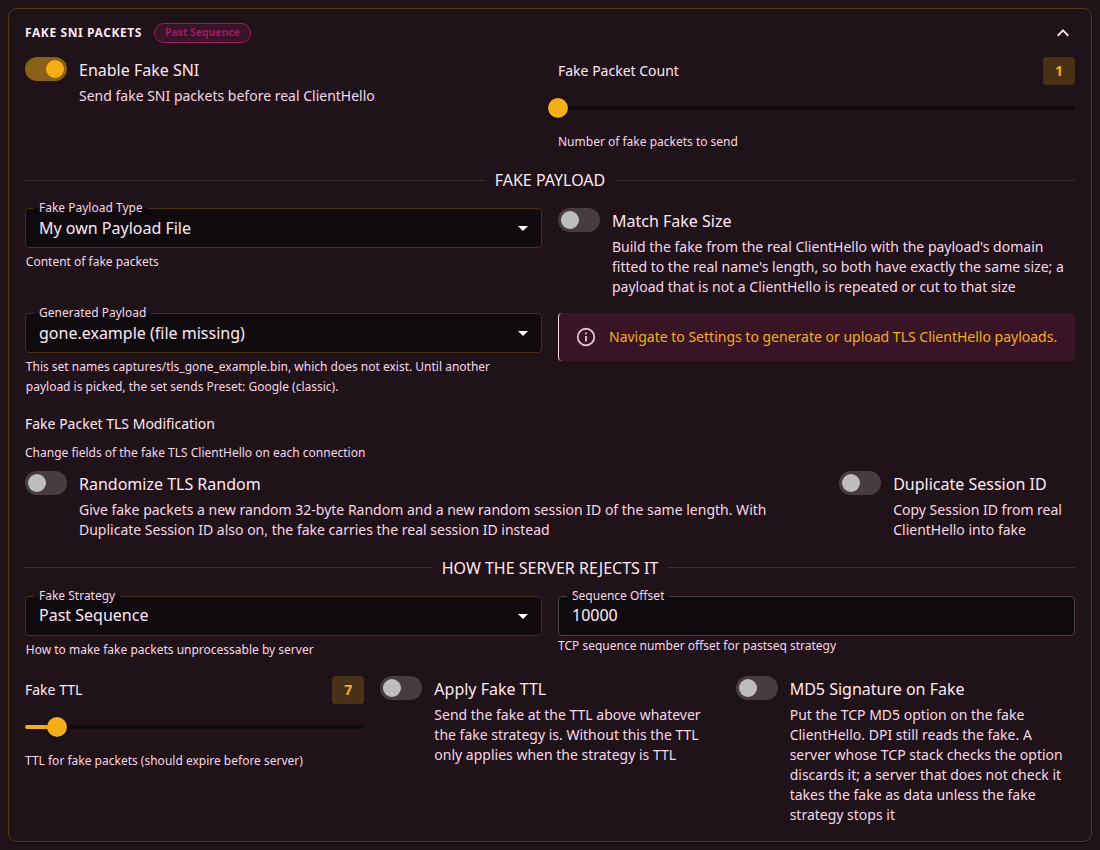
| Field | What it does | Default |
|---|---|---|
| Enable Fake SNI | Sends fake packets before the real ClientHello. | On |
| Fake Packet Count | How many fakes to send, 1 to 20. | 1 |
Fake payload
| Field | What it does | Default |
|---|---|---|
| Fake Payload Type | What the fake carries, see the table below. | Preset: Google (classic) |
| Match Fake Size | Builds the fake from the real ClientHello with the payload's domain fitted to the length of the real name, so both have the same size. A payload that is not a ClientHello is repeated or cut to that size. On a 1500-byte link a payload file larger than 1448 bytes, what one packet with TCP timestamps carries, is refused unless this switch is on, and the editor shows a warning for it. | Off |
| Randomize TLS Random | Replaces the 32-byte Random field and the Session ID of each fake with random values. | Off |
| Duplicate Session ID | Copies the Session ID of the real ClientHello into the fake. It takes precedence over the random Session ID of Randomize TLS Random. | Off |
| Payload type | The fake carries |
|---|---|
| Random | Random bytes. |
| Preset: Google (classic), Preset: VK | A ClientHello for that site. |
| Preset: STUN | A STUN request. |
| My own Payload File | A TLS payload from Settings > Payloads, chosen in Generated Payload, see below. |
| All Zeros | Zero bytes. |
| Inverted Original | The real ClientHello with every bit inverted. |
| Generated from Domain | A ClientHello generated for the domain entered in Domain. |
| Custom | The text in Custom Payload, byte for byte. Listed only for a set that already has such text. |
With My own Payload File, the Generated Payload list offers the TLS payloads from Settings > Payloads whose file is present and not empty, sorted by name. A line under each name gives its origin, kind and size, and the number of malformed fields when there are any. QUIC payloads belong to the UDP tab and are not listed.
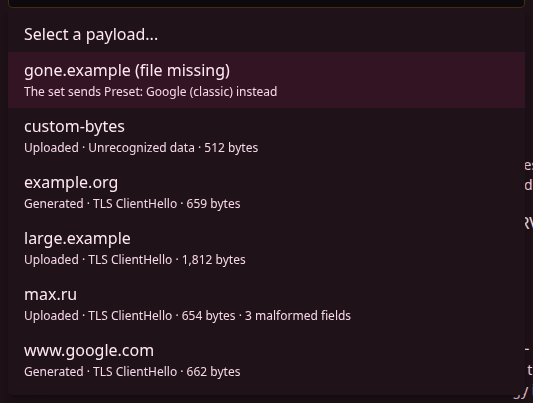
A file the set names that is gone from the router stays selected, with (file missing) after its name, and an empty file gets (file empty). The text under the list then says the set sends Preset: Google (classic) until another payload is picked. A file that is on the router but not in the payload list, such as one copied there by hand, gets (not in the list), and the set sends it as it is. A file larger than a payload may be gets (too large), and the set sends Preset: Google (classic). A QUIC payload the set already names stays selected as well, with a note to pick a TLS ClientHello. While the set sends fakes and no payload is chosen, or Generated from Domain has no domain, a warning says the set sends Preset: Google (classic).
Randomize TLS Random and Duplicate Session ID are under Fake Packet TLS Modification. It is shown only when the fake is a TLS ClientHello these switches can change:
- with Preset: Google (classic), Preset: VK and Generated from Domain;
- with My own Payload File, when the chosen payload is a TLS ClientHello or the set sends Preset: Google (classic) in its place;
- with Inverted Original, only while the set also sends SYN Fake Packets with a SYN Fake Payload Length above
0, or the decoy of a Combo or Hybrid split with Enable Decoy on.
It is hidden for Random, Preset: STUN, All Zeros and Custom.
Fake strategy
The How the server rejects it section decides why the server discards the fake while DPI reads it.
| Field | What it does | Default |
|---|---|---|
| Fake Strategy | How the fake becomes unusable to the server, see the table below. | Past Sequence |
| Sequence Offset | How far the sequence number is moved, for Random Sequence and Past Sequence. | 10000 |
| Timestamp Decrease | How much the TCP timestamp is decreased, for TCP Timestamp. | 600000 |
| Fake TTL | The TTL of the fakes, 1 to 64. It has to reach the DPI and expire before the server. SYN MD5 Signature, OOB, UDP fakes, the Combo decoy, Overlap Length and Post-ClientHello RST use it too, also with Fake SNI Packets off. | 7 |
| Apply Fake TTL | Uses Fake TTL whatever the strategy. Without it, the TTL applies only with the TTL strategy. | Off |
| MD5 Signature on Fake | Puts the TCP MD5 option on the fake. DPI still reads it. A server that checks the option discards the fake, and one that does not takes it as data unless the fake strategy stops it. | Off |
| Strategy | Why the server discards the fake |
|---|---|
| TTL | The fake expires on the way and never reaches the server. |
| Random Sequence | Its TCP sequence number is random. |
| Past Sequence | Its sequence number is one the server has already processed. |
| TCP Check | Its TCP checksum is wrong, and it acknowledges data the server never sent. |
| MD5 Sum | It carries a TCP MD5 option. A server that does not check the option takes the fake as data. |
| TCP Timestamp | Its TCP timestamp is too old. On a connection without TCP timestamps, as from Windows by default or to a server that refuses them, the fake goes out as with TCP Check instead, and the log shows a warning that names the set and the device. |
The right TTL depends on how many hops away the DPI is. Discovery finds it, and for manual tuning 3 is a starting point.
SYN Fake Packets
Fake SYN packets sent during the TCP handshake, before the real connection starts. An aggressive technique: fake SYNs can upset some network equipment.
| Field | What it does | Default |
|---|---|---|
| SYN Fake Packets | Sends fake SYN packets during the handshake. | Off |
| SYN MD5 Signature | Sends a fake SYN with a TCP MD5 option before the real handshake, at Fake TTL from Fake SNI Packets. | Off |
| SYN Fake Payload Length | 0 sends the header only, a larger value adds a fake TLS payload, up to 1200 bytes. | 0 |
| SYN Fake TTL | The TTL of the fake SYNs of SYN Fake Packets, 1 to 100. | 7 |
TCP Desync Attack
Fake TCP control packets with broken checksums and a low TTL. They confuse DPI that tracks connections, and the server drops them.
| Field | What it does | Default |
|---|---|---|
| Desync Mode | Which packets to send, see the table below. | Disabled |
| Desync TTL | 1 to 50, low enough for the packets to expire before the server. | 7 |
| Desync Packet Count | Fake packets per desync with RST Packets, FIN Packets or ACK Packets, 1 to 20. The two combined modes send a fixed set. | 3 |
| Post-ClientHello RST | Sends a fake RST after the ClientHello, to remove the connection from the DPI's tracking table. | Off |
| Mode | What it sends |
|---|---|
| RST Packets | Fake RSTs, so DPI takes the connection as torn down. |
| FIN Packets | Fake FINs with old sequence numbers, so DPI takes the connection as finished. |
| ACK Packets | Fake ACKs with random future sequence and acknowledgment numbers. |
| Combo (RST + FIN) | RST, FIN and ACK packets in sequence. |
| Full (RST + FIN + ACK) | A fake SYN, then RST, PSH and URG packets. |
Window Manipulation
Fake ACK packets with changed TCP window sizes, sent with a low TTL before the real packet. The window of the connection's own packets is a separate option, Real TCP window (wssize).
| Field | What it does | Default |
|---|---|---|
| Window Mode | Disabled. Zero Window sends a window of 0, then 65535. Random Window sends 3 to 5 fakes with sizes from the list. Oscillate goes through the list in order. Escalate grows from 0 to 65535 in steps. | Disabled |
| Custom Window Values | The list for Random Window and Oscillate, values 0 to 65535. An empty list uses the defaults. | 0, 1460, 8192, 65535 |
Incoming Response Bypass
For DPI that slows a connection down once about 15-20 KB have come from the server. b4 sends fake packets towards the server that DPI sees and that expire before they reach it.
| Field | What it does | Default |
|---|---|---|
| Incoming Mode | Disabled. Fake Packets sends a broken ACK for every incoming data packet. Reset Injection, FIN Injection and Desync Combo send fake RST, FIN, or RST, FIN and ACK once the incoming data reaches the threshold. | Disabled |
| Corruption Strategy | How the fakes of Fake Packets are made unusable: Bad Checksum, Bad Sequence, Bad ACK, Random for each packet, or All Corruptions. The other modes rely on Fake TTL alone. | Bad Checksum |
| Fake TTL | 1 to 20. | 7 |
| Fake Count | Fake packets per injection, 1 to 10. | 3 |
| Threshold Min, Threshold Max | The incoming data, in KB, that triggers an injection. Each connection picks a value between the two. Not used by Fake Packets. | 14, 14 |
In NFQUEUE mode, while any enabled set has an incoming mode other than Disabled or uses Collect detected IPs, the server's first packets reach b4 on every connection b4 sends fakes or split segments into, whichever set takes the connection. While no set does, only the SYN-ACKs and resets of those connections reach b4. See Packet marks.
ClientHello Mutation
Changes the real ClientHello, not a fake, so that it does not match known DPI signatures.
Mutation changes the ClientHello that reaches the server. When a site stops opening after mutation is turned on, turning it off is the first check.
| Field | What it does | Default |
|---|---|---|
| Mutation Mode | Disabled, Random (random extension order and noise), GREASE Extensions, Padding, Fake Extensions (unknown TLS extensions), Fake SNIs (extra server names) or Advanced (All), which combines them with all their settings. | Disabled |
| GREASE Extension Count | 1 to 10. | 3 |
| Padding Size | The size of the ClientHello with padding, 256 to 16384 bytes. | 2048 |
| Fake Extension Count | 1 to 15. | 5 |
| Add Fake SNI | Extra server names put into the ClientHello next to the real one. | ya.ru, vk.com, max.ru |