Browsing the catalogue
The Community page is in the navigation while the Community Hub is on. It lists the catalogue the router holds, one card per set, best rated first.
Status line
The line at the top shows the catalogue build date, the number of sets, the time of the last sync, the network the hub sees the router on, and the number of reports waiting to be sent. Sync now fetches the catalogue and delivers the waiting reports.
Two states replace the list with a warning:
| Warning | Cause |
|---|---|
| The Community Hub is off | Enable Community Hub under Settings, Integrations is off. |
| No trusted hub key | The key in the settings does not decode, so no catalogue can be verified. Running a hub describes where that key comes from. |
An expired catalogue does not replace the list. A warning appears above it once no hub has answered for two weeks, and the last catalogue received stays listed. The error of the last failed sync appears in the same place.
Search
The Domain field narrows the list to the sets that cover a domain. A pasted URL is reduced to its hostname. A set matches through:
- an exact domain entry;
- a domain entry that covers the domain as a suffix;
- a
regexp:entry; - a geosite category named after the domain,
youtubeforwww.youtube.com, which matches without a geosite database; - a geosite category that contains the domain, looked up in the geosite database installed on this router. A category the database does not hold is skipped, and so is a category of more than 25000 entries, too broad to answer a domain search.
Each card names the entry it matched through, for example "covers it through the category youtube". With the field empty, the whole catalogue is listed.
The order is:
- the closer match: an exact domain, then a suffix, then a
regexp:entry, then a category; - the nearer network with reports: this ISP, then this country, then worldwide;
- the higher score;
- the larger number of reports;
- the more recent update.
The set card
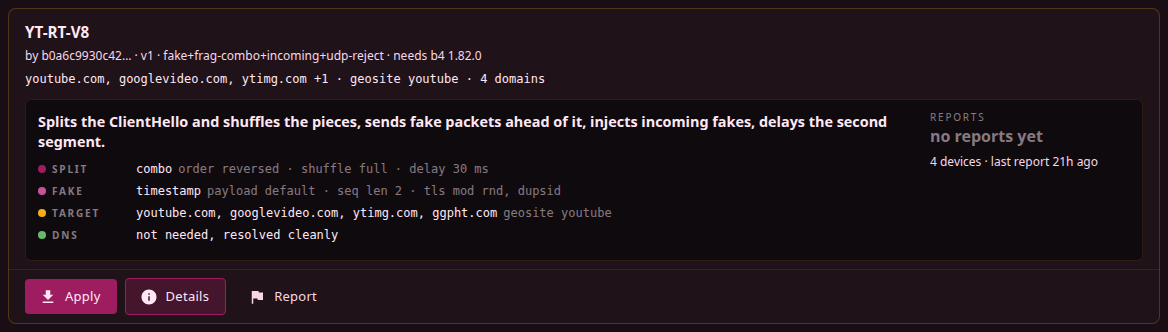
The header shows the title, the author label, the version, the technique family, the b4 version the set needs, and the targets: the first domains, the geosite and geoip categories, the ASNs, the total number of domains and addresses. The badges on the right:
| Badge | Meaning |
|---|---|
| Applied | A local set was created from this hub set and its strategy is unchanged. Opens the local set. |
| Applied, edited | The local set exists and its strategy was changed after it was applied. |
| needs payload | The fake packets use a captured ClientHello. Applying fetches the file from the hub. |
| block | A blocking set: routing in block mode. |
| pins | The set pins domains to fixed addresses. They are listed under Details and, after applying, in the set's DNS tab. |
| blanket | The set targets geosite categories only. It is listed without domain filtering. |
| catch-all | At least one domain entry is a regexp: pattern. |
Below the badges, and below the description when the set has one, the strategy summary states what the set does to packets, in the same form as a Discovery result. Reports next to it shows the score.
The score
The score is the share of reports that say the set works, shown as "N% works", with the weight those reports still carry, the number of routers that sent them, and the date of the last one. The weight is printed in the form "N reports" and shrinks as the reports age, so the figure falls even when nothing new arrives. The page shows the nearest network with enough reports:
- on your ISP: routers the hub saw on the same ASN as this router;
- in your country: routers from the same country;
- worldwide: all routers.
A network has enough reports when at least two routers reported from it and their reports together carry a weight of at least one. Until the router knows its own network, only worldwide reports are shown: the network comes from the hub at the first sync, or before that from the last DPI detector run. A set below the threshold in every network shows "no reports yet".
Reports are weighted, and the weight decays; the rules are on Reports and complaints. A set that stopped working sinks within a couple of weeks of the first broken reports, whatever it collected before. A set with two works reports and nothing else shows 75%, not 100%.
The score describes other networks. DPI differs between regions of one ISP and changes without notice. Test on an applied set, described under Applying a set, checks the set on this connection.
Details
Details opens everything the catalogue holds about the set: the score and the network it is for, the full author label, the version with the b4 version it needs and the version it was built on, the capture engine of the author, the creation and update dates, the strategy fingerprint, the full list of domains, categories and addresses, the strategy summary, the payload files with their sizes, and the set JSON with a copy button. Apply and Report are available in the dialog as on the card.
A link to a set that is not in the local catalogue, such as a set still waiting for a moderator, opens the dialog with a note saying so.